Pandas Nullable Strings: Preserve Missingness and Make Filters Explicit
Clean text without erasing missing values, choose literal versus regex matching, and audit the unknown cases in boolean filters.
Reviewed October 8, 2026. Examples target pandas 2.2.3 and use synthetic text fields.
A text-cleaning pipeline can produce a tidy-looking column while changing what its values mean. Converting an identifier to a number removes leading zeros. Converting a missing value carelessly can turn it into literal text. A search for a dot can match almost every nonempty string because a regular expression treats the dot as a wildcard. These errors occur before any sophisticated analysis begins.
Pandas' nullable string dtype helps represent text and missingness consistently. It also produces nullable boolean results for many text operations. This guide shows how to use those behaviors deliberately, distinguish absence from blank text, and explain which rows a filter includes or excludes.
1. A storage dtype is not an input validator
Explicit dtype="string" creates a string representation with a missing marker such as pd.NA under the pandas 2.2.3 contract used here. String methods preserve missingness for ordinary elementwise transformations. That is useful when a dataset needs text operations without first replacing absence with invented words.
However, selecting a string dtype can convert non-string values into strings. A numeric value that was accidentally placed in a name field may become textual digits rather than raising an error. If original Python types are part of the input contract, validate them before conversion. Storage consistency and evidence that upstream data was correctly typed are different achievements.
Also distinguish None, the literal string "None", and an empty string. The first can represent missing input; the second is supplied text; the third has length zero. Whether any of them should be treated as missing depends on the schema. A blanket replacement can erase distinctions needed for an audit.
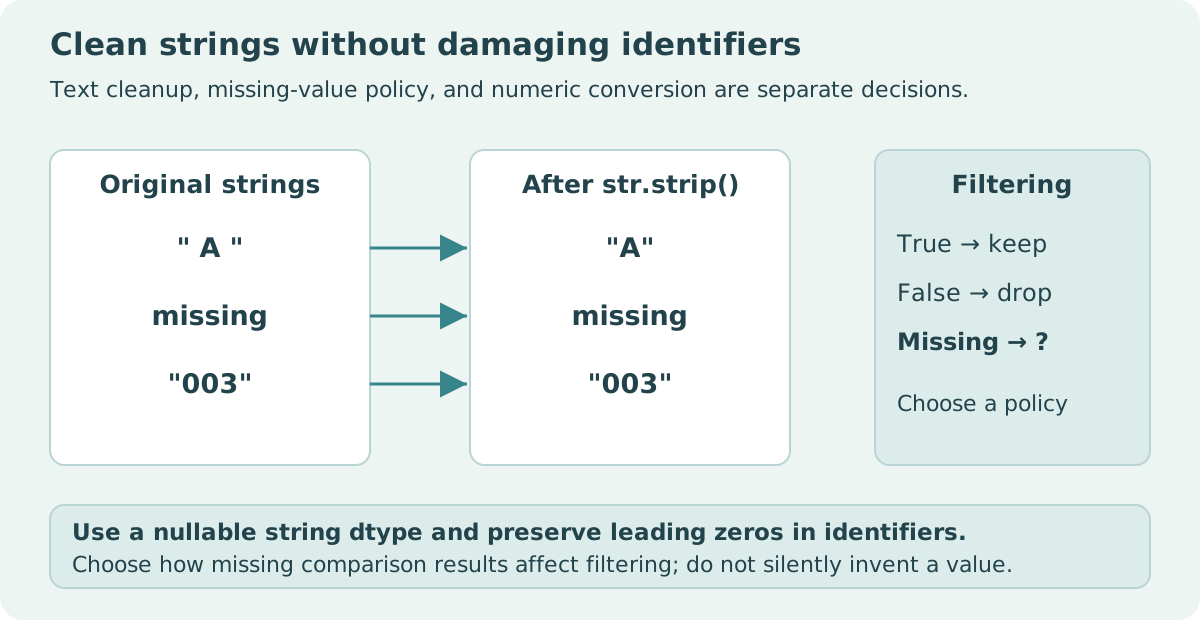
003 to a number. Open full-size diagram.2. Normalize only the properties the contract allows
import pandas as pd

raw = pd.Series([" A ", None, "003", "", "None"], dtype="string")
clean = raw.str.strip()
assert clean.iloc[0] == "A"
assert pd.isna(clean.iloc[1])
assert clean.iloc[2] == "003"
assert clean.iloc[3] == ""
assert clean.iloc[4] == "None"
assert raw.iloc[0] == " A "
audit = pd.DataFrame({"raw": raw, "clean": clean,
                      "missing": clean.isna(),
                      "blank": clean.eq("").fillna(False)})
assert audit["missing"].sum() == 1
assert audit["blank"].sum() == 1
print(audit.to_string(index=False))
The original series remains available, so a reader can inspect what stripping changed. Missingness and blankness receive separate flags. The literal text None is not silently converted to absence. If an upstream format uses a sentinel for missing values, document that sentinel and how a genuine occurrence of the same text is escaped or disambiguated.
Case conversion, Unicode normalization, and whitespace cleanup solve different problems. Stripping outer whitespace does not remove internal whitespace, establish a canonical Unicode representation, or make two names equivalent. Choose each transformation for a stated matching requirement and retain enough original data to explain collisions.
3. Literal matching and regular expressions answer different questions
str.contains uses regular expressions by default. A literal dot therefore needs regex=False when the question is whether the text contains that character. Missing results also need a policy: by default, a nullable string search can yield an unknown boolean for an absent input.
import pandas as pd

text = pd.Series(["Alpha", None, "a.b", "axb", ""], dtype="string")
literal = text.str.contains(".", regex=False)
pattern = text.str.contains(".")
assert literal.fillna(False).tolist() == [False, False, True, False, False]
assert pattern.fillna(False).tolist() == [True, False, True, True, False]
assert literal.isna().sum() == 1
assert text[literal].tolist() == ["a.b"]
keep_unknown = text[literal.fillna(True)]
assert pd.isna(keep_unknown.iloc[0])
assert keep_unknown.iloc[1] == "a.b"
explicit = text.str.contains(".", regex=False, na=False)
assert text[explicit].tolist() == ["a.b"]
print("Literal match:", text[explicit].tolist())
The regular expression matches a character in Alpha and axb; the literal search does not. The empty string matches neither. Filling the unknown mask with true keeps the missing row for review, whereas filling it with false excludes that row. Both are mechanical choices, and neither establishes whether the absent text would have matched.
| Input | Contains literal dot? | Matches regex dot? | Reason |
|---|---|---|---|
| Alpha | False | True | Regex dot matches a character |
| Missing | Unknown | Unknown | No text supplied |
| a.b | True | True | A literal dot and other characters are present |
| axb | False | True | Regex match does not require a literal dot |
| Empty string | False | False | No character available |
4. Understand unknown boolean results before combining rules
Nullable booleans support three-valued logic. A false condition combined with an unknown condition using & is false: the conjunction cannot be true. A true condition combined with an unknown condition is unknown because the result depends on the missing information. Similarly, true combined with unknown using | is true.
import pandas as pd

left = pd.Series([False, True, True, False], dtype="boolean")
unknown = pd.Series([pd.NA] * 4, dtype="boolean")
and_result = left & unknown
or_result = left | unknown
assert and_result.iloc[0] == False
assert pd.isna(and_result.iloc[1])
assert or_result.iloc[2] == True
assert pd.isna(or_result.iloc[3])
print(pd.DataFrame({"left": left, "and": and_result, "or": or_result}))
Boolean indexing treats unknown mask positions as false in this pandas version. That selection behavior is not proof that the underlying condition was false. Keep an unknown subset when its size or content matters to the report. Otherwise an apparently simple filter can silently discard the very rows that need investigation.
Use parentheses around separate vector conditions and use elementwise operators rather than Python's scalar and or or. Also check index alignment when combining masks constructed from different series. A correct individual rule can yield an incorrect selection if the masks refer to different row identities.
5. Make denominator changes visible
An export is a separate missing-value boundary. A plain text format may serialize an absent value and empty text identically unless an explicit convention separates them. After cleaning, test the chosen writer and reader together with actual missing markers, empty strings, and a literal sentinel. Preserving pd.NA inside a DataFrame does not establish that the distinction survives a file transfer. Carry the schema and parsing options with the dataset rather than relying on a destination application's inference.
A report about matching text should state whether its denominator is all records, records with known text, or records retained after cleaning. Count true, false, and unknown results before applying the final selection policy. A rising match rate can result from excluding more missing records rather than from more matches.
Do not drop duplicates after normalization without a key policy. Two distinct original identifiers can collapse to the same cleaned value after case conversion or whitespace removal. Audit those collisions and decide whether they represent duplicate records, equivalent labels, or information that must remain separate. A string method cannot answer that domain question.
For large columns, benchmark the actual backend and operation if performance matters. This article makes no speed comparison between nullable string storage and object storage. Correctness examples with five rows cannot support such a conclusion, and version or backend changes may affect both behavior and cost.
6. A small, defensible text-cleaning workflow
Preserve raw values, validate allowed input types where necessary, apply named normalization rules, and retain flags for missing, blank, and invalid content. Build masks against the intended column and row index. Choose an explicit unknown-result policy at the filtering boundary, then reconcile selected and excluded records.
As an exercise, add " " and "A.B" to the literal-search fixture. Decide whether whitespace-only text becomes blank and whether case affects the actual matching question. Next, compute a match rate over all rows and over known-text rows. Explain the difference using counts before presenting either percentage as the answer.
Sources and scope
The examples demonstrate storage and filtering mechanics. They do not establish a universal definition of valid names, identifiers, or missing-value sentinels.