Write a Python JSON File Without Publishing Half of the New Version
Stage a complete JSON file beside its destination, validate it before replacement, and understand why atomic visibility is different from durability or locking.
A report reader opens summary.json while a Python job is rewriting it. The old content has already been truncated, but the new content is only halfway written. The reader sees invalid JSON even though yesterday's file and the intended new file were both valid.
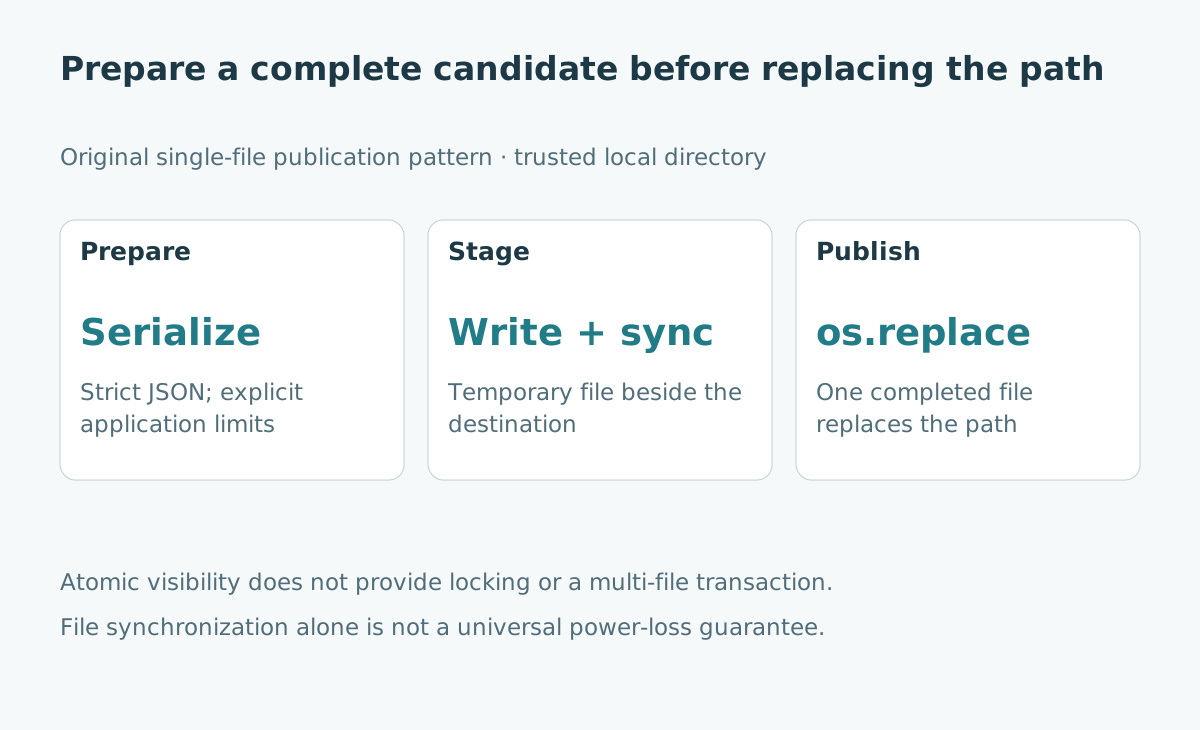
For a small local snapshot, a useful pattern is to prepare a complete new file beside the destination and replace the destination only after preparation succeeds. This changes when the new version becomes visible. It does not turn a file into a database or settle every question about crashes, concurrent writers, metadata and storage hardware.
The Python 3.12 operating-system documentation describes os.replace and its atomic successful rename behavior, including possible failure across filesystems. The temporary-file documentation provides the staging building blocks. These are established APIs, not new Python 3.15 features. The example below uses only the standard library.
State the reader's contract first
The intended reader opens the destination pathname afresh for each snapshot. It should receive the old complete version or the new complete version, rather than a partially overwritten new version, on a filesystem supporting the expected atomic replacement semantics.
A reader already holding the old file open may continue reading that old object. Atomic replacement does not force every existing handle to switch content, and platform sharing rules can also affect whether replacement succeeds. Test the actual deployment platform.
The writer should own the destination and its directory. This tutorial is not a defense against hostile users replacing path components. It assumes a trusted directory and one intended publisher.
Validate before touching the publication path
Serialization can fail. A value may contain an unsupported object or a non-finite number such as NaN. Perform serialization before opening the destination or creating a staged file.
The code requires an ordinary dictionary as the root and disables non-standard numeric constants. It also bounds the serialized byte length. Those choices define a tiny application contract; they do not validate business fields or make unbounded inputs safe to serialize.
For example, the function does not prove that a customer identifier exists or that an amount is positive. Validate those rules earlier. It also does not prevent a huge input object from consuming memory during serialization, so accept only appropriately bounded application data.
Stage beside the destination
A temporary file in an arbitrary system directory may live on a different filesystem. Place the staging file in the destination's parent directory to avoid that avoidable mismatch.
Give it a recognizable private prefix, close it before replacement, and avoid exposing the staging name as a reader endpoint. The function below uses a context manager for the write handle and explicitly removes an unpublished temporary file after failure.
import json
import os
from pathlib import Path
from tempfile import NamedTemporaryFile, TemporaryDirectory


def publish_json(path, value, *, max_bytes=16_384):
    path = Path(path)
    if type(value) is not dict:
        raise TypeError("The snapshot root must be a dictionary")
    if type(max_bytes) is not int or max_bytes <= 0:
        raise ValueError("max_bytes must be a positive integer")
    payload = (json.dumps(value, ensure_ascii=False, allow_nan=False)
               + "\n").encode("utf-8")
    if len(payload) > max_bytes:
        raise ValueError("Serialized snapshot exceeds the byte limit")

    staged = None
    try:
        with NamedTemporaryFile(mode="wb", dir=path.parent,
                                prefix=".snapshot-", delete=False) as handle:
            staged = Path(handle.name)
            handle.write(payload)
            handle.flush()
            os.fsync(handle.fileno())
        os.replace(staged, path)
        staged = None
    finally:
        if staged is not None:
            staged.unlink(missing_ok=True)


with TemporaryDirectory() as directory:
    target = Path(directory) / "summary.json"
    publish_json(target, {"version": 1, "city": "Jakarta"})
    before = target.read_bytes()
    try:
        publish_json(target, {"amount": float("nan")})
    except ValueError:
        pass
    else:
        raise AssertionError("Non-finite values must fail")
    assert target.read_bytes() == before
    publish_json(target, {"version": 2, "city": "Bandung"})
    assert json.loads(target.read_text(encoding="utf-8"))["version"] == 2
    assert list(Path(directory).glob(".snapshot-*")) == []
    print("Old snapshot preserved on validation error; new snapshot published")
Name the publication point
The call to os.replace is the publication attempt. Earlier work prepares a candidate. Later work should not pretend that publication has not happened if the replacement succeeded.
The code sets its staging variable to None only after that call returns. If writing or replacement fails, the finally block attempts to delete the candidate. Cleanup can itself fail, for example because of permissions; production logging should retain both the original failure and any cleanup issue.
An abrupt process termination can bypass Python cleanup entirely. A directory maintenance policy may be needed for abandoned staging files. It should identify safe candidates carefully rather than deleting arbitrary files with similar names.
Separate visibility from crash durability
flush moves buffered Python output onward; fsync requests synchronization of the staged file. These operations are useful, but they do not establish every aspect of power-loss recovery for the directory entry changed by replacement.
A stronger durability design may need platform-specific directory synchronization, filesystem guarantees and storage behavior. This portable teaching function does not promise that a just-replaced pathname will survive sudden power loss on every system.
| Property | What this example attempts | What remains outside its promise |
|---|---|---|
| Valid candidate | Serialize strict JSON before staging | Business-schema correctness |
| Publication visibility | Replace one completed file | Multiple related files together |
| File synchronization | Flush then synchronize staged file | Universal crash durability |
| Cleanup | Remove unpublished stage after normal failure | Cleanup after forced termination |
| Writer coordination | One intended writer | Conflict detection and locking |
Handle concurrent publishers explicitly
Two writers can both build valid snapshots. If both replacements succeed, the later replacement can overwrite the earlier result. Neither writer has detected the business conflict.
Adding a version field helps readers understand a snapshot but does not itself create a compare-and-swap operation. A writer that reads version seven, prepares eight, and later replaces the file can still overwrite someone else's version eight.
Use a real coordination mechanism when concurrent updates matter. Depending on the workload, that may mean a single writer process, an appropriate lock, a database transaction, or storage with conditional-write semantics. Select it from the deployment's guarantees rather than assuming atomic replacement includes coordination.
Remember permissions and metadata
Replacement publishes the staged file, including its metadata characteristics. Do not assume the old destination's permissions, ownership or extended attributes are automatically preserved.
Set the intended metadata according to the application's access requirements and platform behavior. A private snapshot should remain private; a file read by another service may need an explicitly managed access policy. Test readers under their actual identities.
The example deliberately avoids a universal permission recipe. A setting suitable for a personal script can be inappropriate for a service account or a shared machine.
Test failure boundaries, not just the happy path
Run the example in a temporary directory. Then test a serialized payload over the limit, an unsupported value, a missing parent directory, and a simulated replacement failure. After each failure, inspect the destination and any remaining staging files.
A passing unit test does not recreate a power cut or certify a network filesystem. It verifies the bounded behavior you actually exercised. Keep deployment-specific durability and concurrency checks separate.
For a small snapshot with a single publisher, this pattern makes a useful improvement: the writer prepares a complete candidate before changing the published pathname. Its value comes from that precise boundary, not from calling the entire workflow “safe.”
Sources and further reading
- Python 3.12: os.replace and os.fsync, checked 24 October 2026.
- Python 3.12: temporary-file interfaces, checked 24 October 2026.
- Related: JSON Lines import boundaries and SQLite transactions.