Python Logging for Data Pipelines: Events, Counts, and Failures You Can Explain
Design useful log events with named loggers, explicit levels, stable context, rejection counts, and reproducible tests without confusing logs with a data audit.
Reviewed October 6, 2026. Examples use Python 3.12.14 and synthetic rows. No customer records, credentials, or external logging service are involved.
A scheduled data job prints “done” and exits. Its report contains fewer rows than yesterday, but no one knows whether the source shrank, validation rejected new values, or the wrong file was processed. Adding a print for every row can create a large transcript without answering any of those questions.
Useful logging begins with questions: which run processed which input, what stage completed, how many records were accepted, and why did the operation fail? The design should let a reader connect related events without recreating the program's entire internal state.
Practical rule: log meaningful events with stable fields and explicit levels, reconcile counts independently, and keep row-level audit data separate when it needs a durable completeness guarantee. Configuration belongs to the application entry point; reusable modules should obtain named loggers without replacing their caller's handlers.
Events are more useful than a narration of every line
A data pipeline usually has a few meaningful boundaries: start, input read, validation complete, output written, and run complete. Failures may occur at each boundary. An event should describe the transition and carry enough context to locate the affected run and artifact.
A run ID is a correlation value, not automatically a secret or proof of authenticity. Use one consistently throughout the job. If parallel workers emit events, include stage or partition identifiers so readers do not mistakenly interpret interleaved output as a single ordered sequence.
| Event | Useful fields | Question answered |
|---|---|---|
| run_started | Run ID, source label, policy version | Which work began? |
| validation_complete | Seen, accepted, rejected | What population reached analysis? |
| output_written | Artifact label, record count | Which result was persisted? |
| run_failed | Run ID, stage, exception context | Where did the operation stop? |
The source label should identify the input meaningfully without indiscriminately dumping a path, access token, or sensitive record. Design an allowlist of useful fields at the event boundary. A log filter that removes a few known strings cannot prove arbitrary messages contain no confidential information.
Understand levels, loggers, and handlers
The Logging HOWTO distinguishes logging levels and the roles of loggers, handlers, filters, and formatters. A named logger lets application code decide where messages go. Handlers route records to destinations; formatters choose their displayed representation.
Use INFO for expected lifecycle events, WARNING for a condition that deserves attention under your operational policy, and ERROR for a failed operation. A rejected row is not automatically an application error. If rejecting malformed rows is the intended workflow, a summary event plus a separate audit may be more useful than thousands of error messages.
Level filtering happens at more than one place. A logger can accept an INFO record while a handler suppresses it. Propagation can send a record to ancestor handlers, producing duplicate output if you also attach overlapping handlers locally. Before adding configuration repeatedly, understand the existing hierarchy.
Basic configuration is useful for a small executable, but an already configured process may ignore a later basicConfig call unless it is explicitly forced. Forcing replacement inside a library can disrupt the caller's logging. Keep configuration in the entry point and test the library's emitted records separately.
A complete event example with inspectable output
The following example owns a dedicated logger and an in-memory handler, so it can verify exact event fields without a real service. In a larger application, configure the corresponding handler once at startup instead of clearing application handlers in reusable code.
import io
import logging

stream = io.StringIO()
logger = logging.getLogger("noetrion.article.pipeline")
logger.handlers.clear()
logger.setLevel(logging.INFO)
logger.propagate = False
handler = logging.StreamHandler(stream)
handler.setFormatter(logging.Formatter(
    "%(levelname)s run=%(run_id)s event=%(message)s"))
logger.addHandler(handler)

try:
    rows = ["30", "0", "oops"]
    accepted, rejected = [], []
    context = {"run_id": "example-001"}
    logger.info("run_started source=synthetic_rows", extra=context)
    for number, text in enumerate(rows, start=1):
        try:
            minutes = int(text)
            if not 0 <= minutes <= 240:
                raise ValueError("outside range")
        except ValueError:
            rejected.append({"row": number, "reason": "invalid minutes"})
        else:
            accepted.append(minutes)
    assert len(rows) == len(accepted) + len(rejected)
    logger.info("validation_complete seen=%d accepted=%d rejected=%d",
                len(rows), len(accepted), len(rejected), extra=context)
    logger.info("run_complete total_minutes=%d", sum(accepted), extra=context)
    output = stream.getvalue()
    assert "seen=3 accepted=2 rejected=1" in output
    assert "total_minutes=30" in output
    assert output.count("run=example-001") == 3
    print(output, end="")
finally:
    logger.removeHandler(handler)
    handler.close()
The percent-style arguments are supplied separately to the logger. This defers message interpolation until the record is formatted, although Python still evaluates argument expressions before the logging call. An expensive function passed as an argument therefore still runs unless you guard its computation appropriately.
The formatter requires run_id. Omitting it from a record using this formatter can cause a formatting failure. A production design might use a LoggerAdapter or another deliberate context-injection mechanism, described in the Logging Cookbook. Test every emitting path rather than assuming all messages carry the same fields.
Distinguish an error event from a swallowed failure
Logging an exception does not handle it by itself. If an output write fails, the job should not report a durable success simply because the exception was recorded. Decide whether the caller needs the failure re-raised, whether a retry is allowed, or whether the entire run should stop.
logger.exception adds exception information when called inside an exception handler. The recorded traceback can be useful for diagnosis, but exception messages may contain sensitive values. Avoid manufacturing exceptions containing whole source records or credentials just to make debugging convenient.
import io
import logging

stream = io.StringIO()
logger = logging.getLogger("noetrion.article.failure")
logger.handlers.clear()
logger.setLevel(logging.ERROR)
logger.propagate = False
handler = logging.StreamHandler(stream)
handler.setFormatter(logging.Formatter("%(levelname)s %(message)s"))
logger.addHandler(handler)
try:
    try:
        raise OSError("synthetic output failure")
    except OSError:
        logger.exception("output_write_failed run=example-002")
    output = stream.getvalue()
    assert "output_write_failed" in output
    assert "OSError: synthetic output failure" in output
    print("Failure event and exception context verified")
finally:
    logger.removeHandler(handler)
    handler.close()
This fixture stops after examining the event. In a real worker, the exception-handling branch must also communicate failure to the scheduler or caller. A success flag should follow successful persistence, not merely successful aggregation in memory.
Logs and audits have different completeness requirements
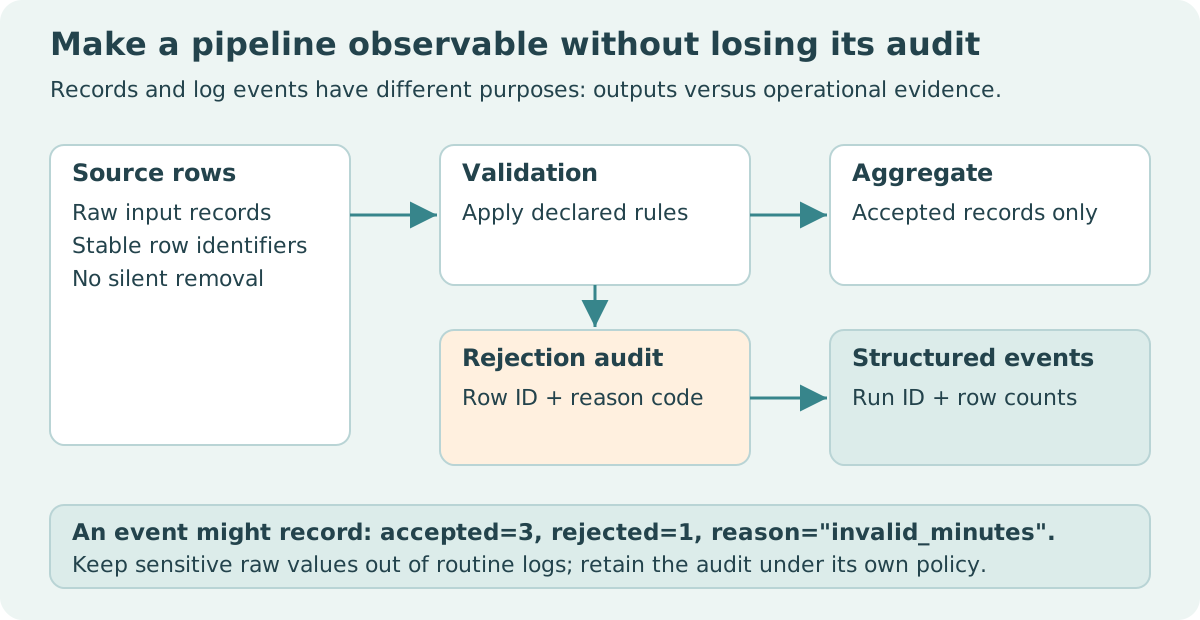
Operational logging often has retention limits, sampling, filtering, delivery delays, or dropped records. It can explain what happened without being a complete accounting ledger of every source row. If you need a full exclusion audit, write a defined artifact and reconcile it against source counts.
The sample logs contain one rejection count; the audit contains the rejected row number and reason. Keeping those roles separate avoids two extremes: a huge noisy log containing every record, or a polished summary with no path back to an exclusion.
| Need | Appropriate evidence | Limitation to acknowledge |
|---|---|---|
| Diagnose a failed stage | Error event and exception context | Message content needs a privacy policy |
| Compare run populations | Stable counts and policy version | A count alone cannot identify rejected rows |
| Review each exclusion | Row-level audit artifact | Artifact persistence must also be checked |
| Measure latency | Explicit timing measurements | Log timestamps alone may not equal stage duration |
If you adopt JSON logs, serialize a defined event object rather than pretending a formatted string is already structured. Preserve numeric fields as numbers where your downstream contract requires them. Stable event names make dashboards and searches easier to maintain than prose that changes with each release.
Test observability like other behavior
Verify that one run emits the intended start and completion events, that rejected rows reconcile, and that a failed write produces a failure event without a success event. Test missing context fields, logger propagation, and repeated configuration so duplicate handlers do not accumulate.
Use fixed synthetic inputs and an in-memory handler for small tests. Then separately verify the actual deployment's delivery path if logs are sent to an external system. This article establishes Python event behavior; it does not claim guaranteed delivery, retention, or confidentiality in an unspecified hosting environment.
Sources and reproducibility
Primary references: Python Logging HOWTO, Logging Cookbook, and logging API. Both examples are self-contained, remove their handlers, and make no external calls. The synthetic population is three rows, two accepted, and one rejected.