Python Pathlib: Build File Workflows with Explicit Roots and Output Rules
Choose an explicit project root, separate raw inputs from outputs, and understand the precise limits of temporary-file replacement.
Reviewed October 8, 2026. Examples target Python 3.12 and operate inside temporary directories.
A notebook reads a CSV successfully, but the same code fails when launched from a terminal. An export overwrites its own input. An interrupted write leaves a report that looks present but contains only its first half. These are different problems, yet they share one cause: the file workflow has assumptions that its code does not make visible.
pathlib makes path construction readable, but a Path object does not choose a project root, preserve raw files, or guarantee a complete export. This guide builds those decisions around the API. The goal is a local workflow whose input location, overwrite policy, encoding, and failure behavior can be explained and tested.
1. A relative path depends on the working directory
Path("data/input.csv") identifies a location relative to the process's current working directory. It is not automatically relative to the Python file containing that expression. IDE launch settings, notebooks, and shell commands can establish different working directories. When debugging, inspect Path.cwd() and the intended root separately.
For a normal script, a root can be derived from a known script location, such as Path(__file__).resolve().parent, or supplied as an explicit argument. In a notebook, __file__ is usually unavailable, so an explicit root configuration is clearer. Avoid guessing by searching every parent directory until some similarly named file appears; that can make the program successfully read the wrong dataset.
Construct paths with / rather than manually concatenating separators. Remember that joining an absolute path component can discard earlier components. Treat a user-supplied filename and a trusted root as different inputs. For ordinary local scripts, reject an unexpected absolute input when the contract requires a relative name.
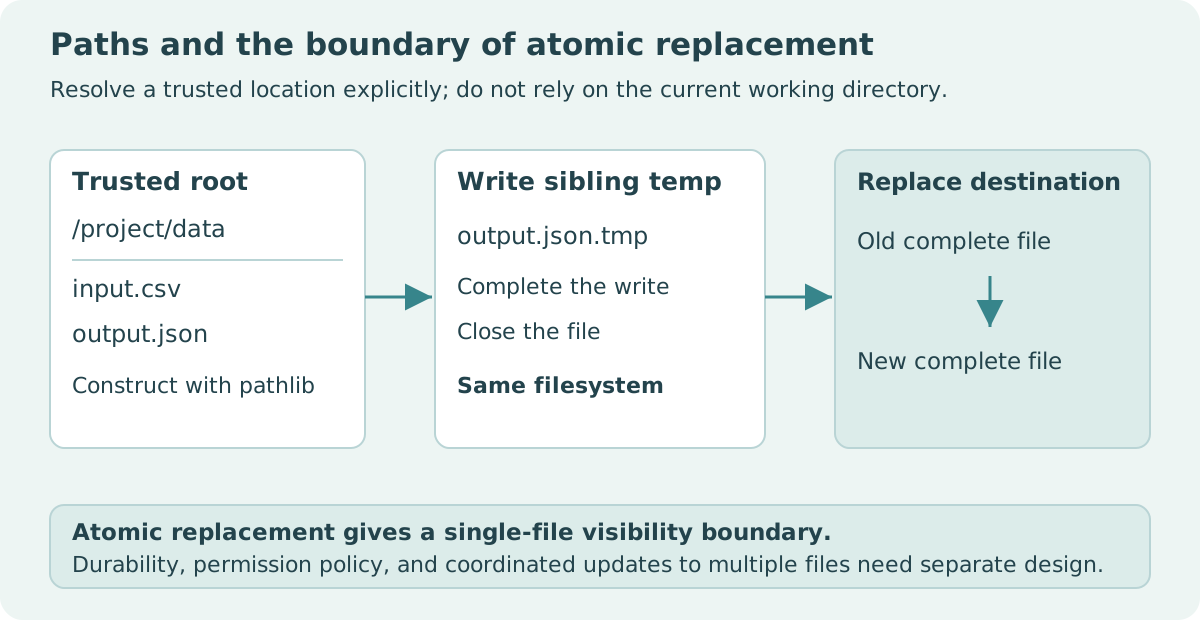
2. Make input and output locations visible
from pathlib import Path
from tempfile import TemporaryDirectory

with TemporaryDirectory() as folder:
    root = Path(folder).resolve()
    raw = root / "raw" / "readings.csv"
    output = root / "reports" / "summary.txt"
    raw.parent.mkdir(parents=True, exist_ok=True)
    output.parent.mkdir(parents=True, exist_ok=True)
    raw.write_text("reading\n2\n3\n", encoding="utf-8")
    before = raw.read_bytes()
    values = [int(line) for line in raw.read_text(
        encoding="utf-8").splitlines()[1:]]
    output.write_text(f"count={len(values)}; total={sum(values)}\n",
                      encoding="utf-8")
    assert output.read_text(encoding="utf-8") == "count=2; total=5\n"
    assert raw.read_bytes() == before
    assert raw.resolve() != output.resolve()
    print(output.name, "was produced without changing the input.")
The fixture's simple numeric format permits splitlines; it is not a general CSV reader. The important file behavior is the separation between raw and reports, an explicit encoding, and a check that input bytes remain unchanged. A real CSV parser should handle quotes and embedded newlines, as discussed in the related CSV article.
exist_ok=True permits an existing directory. It does not grant permission, verify free storage, or make every later operation succeed. Similarly, checking exists() before opening a file does not guarantee that the file will still be available when opened. Handle errors from the actual operation, and keep the error tied to the relevant path.
3. Avoid exposing a partially written replacement
A direct write to an existing destination can truncate it before the new content is complete. A common local strategy is to write a temporary file in the destination's directory, close it, and replace the destination after the content is ready. A sibling temporary file helps keep source and destination on the same filesystem.
import os
from pathlib import Path
from tempfile import NamedTemporaryFile, TemporaryDirectory

def replace_text(destination, text):
    destination = Path(destination)
    destination.parent.mkdir(parents=True, exist_ok=True)
    temporary = None
    try:
        with NamedTemporaryFile(mode="w", encoding="utf-8",
                                dir=destination.parent, delete=False) as handle:
            temporary = Path(handle.name)
            handle.write(text)
        os.replace(temporary, destination)
    finally:
        if temporary is not None:
            temporary.unlink(missing_ok=True)

with TemporaryDirectory() as folder:
    target = Path(folder) / "report.txt"
    target.write_text("old\n", encoding="utf-8")
    replace_text(target, "new complete report\n")
    assert target.read_text(encoding="utf-8") == "new complete report\n"
    assert sorted(p.name for p in target.parent.iterdir()) == ["report.txt"]
    print("The replacement is complete; no temporary file remains.")
The example tests successful replacement and temporary-file cleanup. It does not inject a filesystem failure or prove crash recovery. The helper replaces existing content deliberately; an application requiring a no-overwrite policy needs a different contract. Do not describe replacement as protecting the previous report from all failures, because once replacement succeeds the old name refers to the new file.
4. Atomic visibility and durability are different
Python documents successful os.replace renaming as atomic, with a POSIX requirement, and warns that different filesystems can cause failure. Atomic visibility means a reader of the destination name does not observe the temporary write's intermediate content as that destination. It does not mean data and directory metadata are guaranteed to survive a sudden power loss.
Durability can require flushing buffers, filesystem synchronization, and platform-specific handling. Preserving original permissions, ownership, or extended metadata also requires explicit decisions. The temporary file may have different metadata from the destination it replaces. A local teaching helper should state these limits instead of presenting itself as a universal production storage layer.
Replacing two files separately is not one atomic operation. A reader could observe a new report paired with an old manifest. For outputs that must be consistent together, consider an immutable version directory plus a version-selection mechanism, or a transactional storage system. That design needs its own failure analysis; adding two calls to replace does not provide it automatically.
| Requirement | Relevant choice | Limit to check |
|---|---|---|
| Stable input location | Explicit root | Notebook and script roots may differ |
| Raw-file preservation | Separate output tree | Resolved paths must not alias the input |
| Complete single-file visibility | Sibling temporary file and replacement | Platform, permissions, filesystem boundary |
| Reproducible output order | Sort discovered input paths | Sorting does not define semantic record order |
| Durable multi-file publication | A separate storage design | Single-file replacement is insufficient |
5. Resolve paths carefully without overstating containment
resolve() can normalize a concrete path and resolve existing symbolic links. is_relative_to() on a pure path is a lexical relationship; it does not by itself inspect the filesystem or specially evaluate parent-directory segments. If a local workflow checks containment, resolve the trusted root and candidate according to its supported filesystem assumptions first.
Even a resolved containment check is not a complete sandbox for a directory tree that an adversary can change concurrently. Symbolic links or directories can change between checking and opening. This article assumes trusted local directories and known filenames. A server handling untrusted uploads needs a stronger filesystem and permissions design rather than simply reusing these examples as a security boundary.
Also choose a deterministic discovery policy. Sort glob results when file order affects output. Explicitly reject duplicate input names or ambiguous formats when appropriate. A stable filename alone does not identify the dataset: retain the source version, relevant parameters, and perhaps a content digest in the run's metadata.
6. A reviewable export contract
Before using the workflow, describe where inputs come from, whether outputs may replace existing files, what encoding is used, and which guarantees are deliberately absent. Tests can verify that input bytes stay unchanged, expected output content is produced, and temporary files are removed after ordinary failures. Keep those checks close to the behavior they protect.
As an exercise, modify replace_text to reject non-string content before creating a temporary file. Then test that the destination remains unchanged when validation fails. That failure occurs before I/O, so its expectation is straightforward. More complex write failures require targeted fault injection and platform testing rather than assuming that a successful temporary-directory demonstration covers them.
Sources and scope
These are original local examples, not a production backup, upload-security, or crash-durability implementation.