Python Profiling: Find the Bottleneck Before Making the Code Faster
Use Python profiling to separate repeated work, CPU time and waiting. Test an indexed lookup and calculate why a local speedup may barely change runtime.
You replace a loop with a clever expression, run the program again, and see almost no improvement. The expression may be faster. It may simply belong to the part of the program that was never making you wait.
Useful optimization starts with a measurable task: produce the same report, for the same input, with less elapsed time or fewer resources. Profiling helps locate work worth investigating. It does not automatically tell you which rewrite is correct, or prove how much faster an application will feel.
Python 3.15 provides a timely reason to revisit that workflow. PEP 799 organizes the standard-library tools under profiling, with tracing and sampling approaches. The current documentation explains how to choose between them. This guide connects that development to an original, executable lookup example and a simple performance budget.
Define which kind of slow you are investigating
A command-line tool can feel slow because imports take time before any useful output appears. A data job may spend time calculating. A network client may mostly wait for another system. An interactive application can finish quickly overall but freeze at the moment a person needs a response.
Choose the outcome first. For a nightly report, completion before a deadline may matter more than startup. For a short command run hundreds of times, startup can dominate. For an interface, a slow individual request can matter even when average throughput looks healthy.
| Question | Measurement to collect | Common mistake |
|---|---|---|
| How long did the user wait? | Elapsed wall time for the operation | Treating CPU usage as the complete experience |
| How much computation did this process consume? | Process CPU time | Assuming waiting requires CPU work |
| Where is work concentrated? | Profile and call relationships | Reading the largest number without its callers |
| Did a change help? | Repeated unprofiled comparison on equivalent inputs | Calling one instrumented run a benchmark |
Python's time documentation distinguishes perf_counter() for elapsed intervals from process_time() for process CPU time, excluding sleep. Both are useful, but they answer different questions. A multithreaded process can also accumulate CPU time across threads, so a simple ratio is not a universal utilization measure.
Choose tracing for counts and sampling for patterns
The Python 3.15 namespace contains profiling.tracing for deterministic tracing and profiling.sampling for statistical sampling. Tracing observes calls; sampling periodically inspects execution. Short-lived functions may be missed between samples, while tracing itself adds overhead.
Use the tool that matches the uncertainty. To ask whether a helper runs once or once per row, exact call counts are valuable. To inspect where a long-running application spends time, sampling can provide a less intrusive overview. A wide stack in a sampling visualization represents accumulated samples under that configuration, not a guarantee that every invocation takes the same duration.
The documented basic 3.15 command is python -m profiling.sampling run script.py. The older cProfile name remains available for compatibility, as specified by PEP 799. The worked example below uses it and was executed on Python 3.12. The new 3.15 sampling command was checked against documentation, not executed in this environment.
Read cumulative time without counting it twice
Imagine build_report() calls load_data() and calculate_totals(). Its cumulative time includes those children. Adding all three cumulative times treats some work as though it occurred twice.
The deterministic profiler reference distinguishes direct time from cumulative time. Direct time concerns the function itself; cumulative time includes calls beneath it. Inspect the call relationship before deciding where an expensive operation originates.
| Profile clue | Useful interpretation | Follow-up question |
|---|---|---|
| High cumulative, low direct time | Much work happens in children | Which child owns the expensive operation? |
| High direct time | Work concentrates inside this function | Is there repeated scanning or avoidable transformation? |
| Huge call count, small per-call time | Cheap work may accumulate | Can calls be avoided without changing meaning? |
| Few samples of a short function | It may be short or rarely observed | Would tracing clarify its invocation count? |
Do not rewrite the outer coordinator simply because it tops a cumulative-time report. It may only be the place through which every useful operation passes.
An original example: repeated product lookup
Our synthetic task contains 1,000 products and 500 orders. Each order requests one of the first 500 products with quantity two. Prices are integer cents so the example does not introduce floating-point money arithmetic.
The first version scans products for each order. The second builds a lookup once within the measured operation, then retrieves prices by key. Both must return the same total. There are no network calls, external files, or dependencies beyond the standard library.
import cProfile
import io
import pstats

products = [{"sku": i, "cents": (i + 1) * 10} for i in range(1000)]
orders = [{"sku": i, "qty": 2} for i in range(500)]

def find_price(rows, sku):
    for row in rows:
        if row["sku"] == sku:
            return row["cents"]
    raise KeyError(sku)

def scanning_total(rows, requests):
    return sum(find_price(rows, r["sku"]) * r["qty"] for r in requests)

def build_index(rows):
    index = {}
    for row in rows:
        if row["sku"] in index:
            raise ValueError("duplicate product identity")
        index[row["sku"]] = row["cents"]
    return index

def indexed_total(rows, requests):
    index = build_index(rows)
    return sum(index[r["sku"]] * r["qty"] for r in requests)

def inspect(function):
    profiler = cProfile.Profile()
    result = profiler.runcall(function, products, orders)
    output = io.StringIO()
    stats = pstats.Stats(profiler, stream=output)
    stats.sort_stats("cumulative").print_stats(8)
    print(output.getvalue())
    return result, stats

slow_result, slow_stats = inspect(scanning_total)
fast_result, fast_stats = inspect(indexed_total)
assert slow_result == fast_result == 2_505_000
find_calls = sum(v[1] for k, v in slow_stats.stats.items()
                 if k[2] == "find_price")
index_calls = sum(v[1] for k, v in fast_stats.stats.items()
                  if k[2] == "build_index")
assert find_calls == 500 and index_calls == 1
The verified result is 2,505,000 cents. Tracing observes 500 calls to find_price() in the scanning version and one call to build_index() in the indexed version. The displayed timing values will depend on the machine and instrumentation; no fixed speedup is claimed here.
Count the avoided work, then inspect the trade-off
For this ordered fixture, the scans inspect 1 + 2 + ... + 500 product rows: 125,250 comparisons. The indexed version visits 1,000 product rows to build the index, then performs 500 dictionary lookups. These are different operations, so their counts are explanatory rather than a prediction that runtime falls in the same ratio.
The index requires memory and construction work. With one order near the start of a tiny list, it may offer little benefit. If an index is retained across operations, product updates need an explicit freshness rule. A fast answer using yesterday's price is still the wrong answer.
Identity policy also matters. The example fixture has unique product keys. The index builder rejects duplicates, while a simple scan would return the first match. Before applying the rewrite to real data, decide and test the intended duplicate behavior. “Same result on this fixture” is narrower than “equivalent for every possible input.”
Calculate the ceiling on the overall benefit
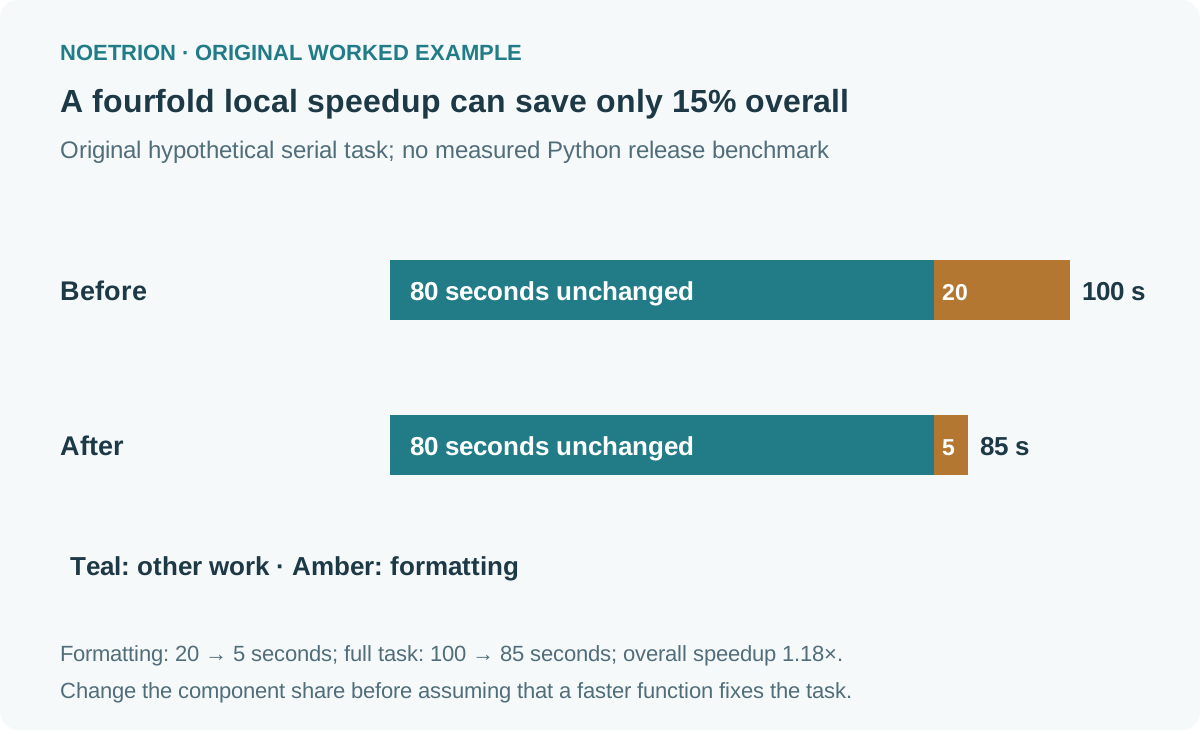
Suppose a different, entirely hypothetical job takes 100 seconds: 20 formatting and 80 elsewhere. Making formatting four times faster changes it to five seconds. The complete job now takes 85 seconds, giving about 1.18 times overall speed and a 15% reduction in elapsed time.
If the optimized component instead accounts for 80 seconds, reducing it fourfold leaves 20 seconds there plus 20 elsewhere: 40 seconds total, or 2.5 times overall speed. The same local improvement has a different application impact because its original share differs.
In this simplified serial model, with fraction f improved by factor s, new relative runtime is (1 − f) + f / s. It assumes unchanged remaining work and no new coordination costs. Concurrency, resource contention, or altered workload can break those assumptions.
Use the calculation to prioritize investigation, not to guarantee a release outcome. A very expensive rewrite of a tiny component may lose to eliminating one unnecessary database round trip.
Benchmark the final change under equivalent conditions
First confirm outputs and edge cases. Then compare unprofiled runs using representative inputs, repeated measurements, and a documented environment. Include index construction if the real request constructs it. Include loading if the user waits for loading.
Record warm-up policy and whether caches, files, or connections are reused. A benchmark that accidentally gives one version a warm cache and the other a cold start measures two different situations. Use a suitable timing tool for the bounded operation rather than treating profiler totals as neutral measurements.
Keep the distribution visible when it matters. One median can hide occasional long delays. For an interactive task, inspect slower cases and failure behavior as well as typical duration. Avoid reporting more precision than the measurement conditions support.
A practical optimization note
Write down the target operation, baseline, suspected bottleneck, correctness conditions, proposed change, memory trade-off, and acceptance result. If the result disappoints, return to the evidence rather than collecting more clever syntax.
For practice, reduce the fixture to one order. Explain why building 1,000 entries may no longer be the most useful choice. Then introduce a duplicate SKU and state the contract you want before changing either implementation. This connects performance work to data meaning, where many seemingly successful optimizations fail.
For larger datasets, the data contract guide helps specify those correctness conditions before comparing implementations.
Primary sources and verification limits
- Python 3.15 profiling documentation, checked October 20, 2026: current namespace and profiling approaches.
- PEP 799, final: organization and compatibility decisions for Python 3.15.
- Python 3.12 deterministic profiler reference: report fields and programmatic profiling.
- Python time reference: elapsed and process CPU clocks.
The lookup code and call-count assertions were executed on Python 3.12. The 100-second budget is synthetic; it is not a measured comparison between Python releases.