Python ZIP Imports: Set Resource Limits Before Reading the CSV Files
Build a bounded Python ZIP-to-CSV reader with filename rules, byte budgets and rejection tests. Understand what archive validation can and cannot prove.
A colleague sends a ZIP containing monthly CSV files. Your script reads it successfully, so you add the same upload workflow to a website. That small change introduces a different question: how much work may an unknown archive ask your application to do?
A valid ZIP can still contain too many members, unexpectedly large decompressed data, ambiguous names, or files your importer should never accept. The useful goal is a narrow import contract: a few flat CSV files, a measured byte budget, and an explicit reason when the bundle is rejected.
The Python 3.15 release page identifies the new stable release, while its ZIP documentation retains warnings about resource exhaustion, interrupted extraction, and overwrite behavior. This example uses established APIs and was executed on Python 3.12. It is not a new 3.15 security feature or a complete upload service.
Define the smallest useful bundle
Start with what the downstream task needs. If the analyst expects sales.csv and returns.csv, accepting nested folders, executable files, and every compression method buys little value. Each extra capability creates another behavior to review.
Our demonstration accepts ASCII filenames ending in lowercase .csv, with letters, digits, underscores, and hyphens in the stem. There are no directory separators. Names are compared without case, so Sales.csv and sales.csv cannot silently become one logical input. Reserved device-style stems are rejected as an additional portability rule.
| Boundary | Demonstration limit | What it bounds |
|---|---|---|
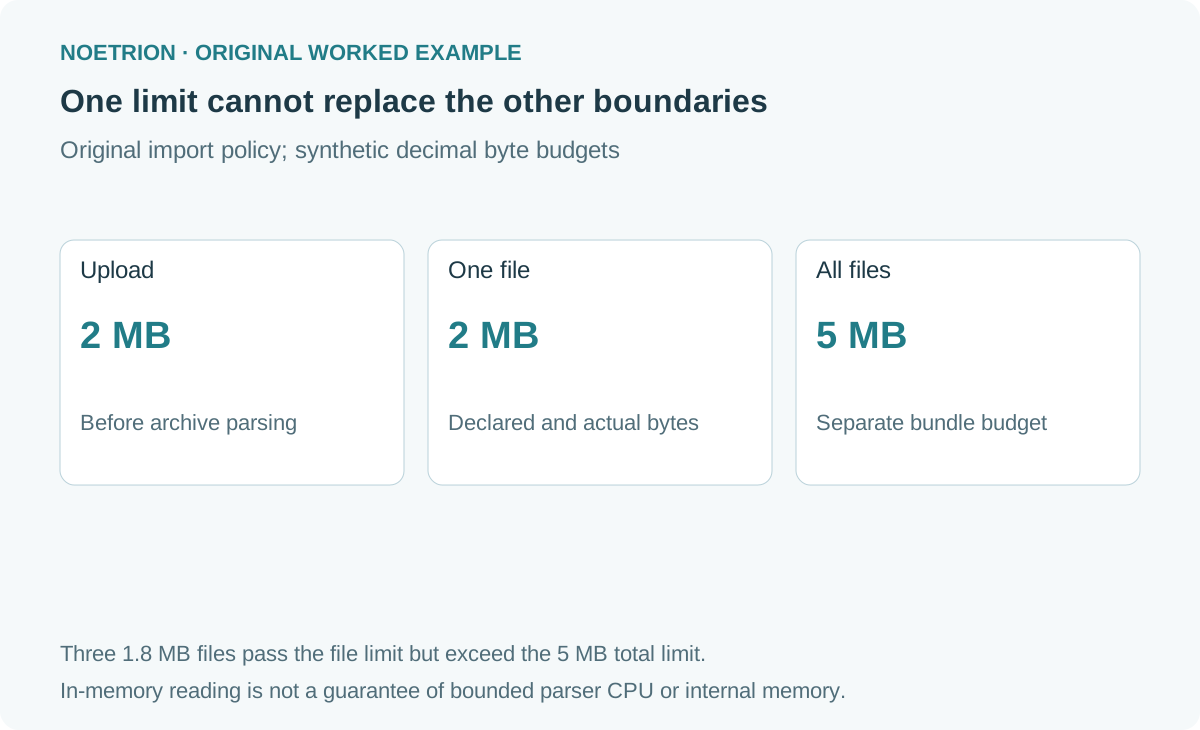
| Uploaded archive | 2,000,000 bytes | Bytes supplied to this function |
| Members | 100 | Entries accepted after the archive is opened |
| One decompressed member | 2,000,000 bytes | Declared and actually read file content |
| All decompressed members | 5,000,000 bytes | Accepted bundle content |
| Declared expansion ratio | 100 to 1 | An early screening rule |
| Compression | Stored or DEFLATE | Two explicitly supported methods |
These are synthetic application choices, not Python defaults or recommended universal limits. A school exercise and an industrial export need different budgets. Record the expected largest legitimate bundle before selecting a threshold; otherwise a strict importer may reject every normal quarterly delivery.
Keep naming and filesystem behavior separate
The ZIP documentation distinguishes zipfile.Path, which does not sanitize archive filenames, from the extraction methods that perform normalization. That distinction should stop a common overstatement: it is inaccurate to describe every standard-library extraction call as an identical traversal vulnerability.
This reader avoids filesystem extraction entirely. Member names become dictionary keys, and content remains in memory. The flat-name rule makes its contract easy to inspect: ../sales.csv, /sales.csv, and quarter/sales.csv are outside the accepted format. Their rejection does not depend on the operating system's interpretation of a destination path.
If you later add extraction, that is a new implementation requiring destination containment, symlink handling, permissions, collision rules, and atomic publication. Do not assume that a dictionary-key check proves the filesystem version safe. The stat module supplies file-type predicates; their application to archive attributes is a policy decision, not evidence about file contents.
Check advertised sizes, then count actual bytes
Suppose a synthetic bundle has three files with declared expanded sizes of 1.8 MB each. Each file fits a 2 MB individual budget, but their total is 5.4 MB. A per-file check alone misses the bundle-level failure.
Conversely, an archive can contain many tiny members whose total content is small. Listing, validating, and tracking those entries still consumes work. A member-count budget addresses a different dimension from a byte budget. Neither is a time limit.
| Synthetic bundle | Individual-size check | Total-size check | Member-count check |
|---|---|---|---|
| Two 1.8 MB files | Pass | 3.6 MB: pass | 2: pass |
| Three 1.8 MB files | Pass | 5.4 MB: reject | 3: pass |
| 101 files of 100 bytes | Pass | 10,100 bytes: pass | 101: reject |
| One 2.1 MB file | Reject | 2.1 MB: pass | 1: pass |
Metadata screening allows cheap rejection before content is read. It does not replace a counter on bytes returned by the decompressor. In the function below, a read may exceed the remaining budget by at most one requested byte before rejection. That extra byte distinguishes an exactly full file from one that continues.
Read a bounded bundle without extracting it
BytesIO provides an in-memory binary stream, documented in Python's I/O reference. This original teaching implementation rejects the entire bundle on a policy failure; it does not return a partly accepted result.
import io
import re
import stat
import zipfile

NAME = re.compile(r"[A-Za-z0-9][A-Za-z0-9_-]*\.csv\Z")
RESERVED = {"con", "prn", "aux", "nul"} | {
    f"{prefix}{n}" for prefix in ("com", "lpt") for n in range(1, 10)
}

def read_csv_bundle(blob, *, max_upload=2_000_000,
                    max_members=100, max_file=2_000_000,
                    max_total=5_000_000, max_ratio=100):
    limits = (max_upload, max_members, max_file, max_total, max_ratio)
    if any(not isinstance(x, int) or isinstance(x, bool) or x <= 0
           for x in limits):
        raise ValueError("limits must be positive integers")
    if not isinstance(blob, bytes) or len(blob) > max_upload:
        raise ValueError("upload outside byte budget")
    result, seen, used = {}, set(), 0
    with zipfile.ZipFile(io.BytesIO(blob)) as archive:
        members = archive.infolist()
        if not members or len(members) > max_members:
            raise ValueError("member count outside contract")
        declared = 0
        for member in members:
            name = member.filename
            key = name.casefold()
            kind = stat.S_IFMT(member.external_attr >> 16)
            if (not NAME.fullmatch(name) or name[:-4].casefold() in RESERVED
                    or key in seen or member.is_dir()
                    or kind not in (0, stat.S_IFREG)):
                raise ValueError("invalid or ambiguous member name/type")
            if member.flag_bits & 1 or member.compress_type not in (
                    zipfile.ZIP_STORED, zipfile.ZIP_DEFLATED):
                raise ValueError("unsupported member encoding")
            declared += member.file_size
            if (member.file_size > max_file or declared > max_total
                    or member.file_size > max_ratio * max(1, member.compress_size)):
                raise ValueError("declared expansion outside budget")
            seen.add(key)
        for member in members:
            data = bytearray()
            with archive.open(member) as source:
                while True:
                    remaining = min(max_file - len(data), max_total - used)
                    chunk = source.read(min(65_536, remaining + 1))
                    if not chunk:
                        break
                    if len(chunk) > remaining:
                        raise ValueError("actual expansion outside budget")
                    data.extend(chunk)
                    used += len(chunk)
            result[member.filename] = bytes(data)
    return result

def fixture(entries):
    output = io.BytesIO()
    with zipfile.ZipFile(output, "w", compression=zipfile.ZIP_STORED) as z:
        for name, content in entries:
            z.writestr(name, content)
    return output.getvalue()

assert read_csv_bundle(fixture([("sales.csv", b"id,total\n1,12\n")])) == {
    "sales.csv": b"id,total\n1,12\n"
}
for entries in ([('../sales.csv', b'x')],
                [('Sales.csv', b'x'), ('sales.csv', b'y')],
                [('con.csv', b'x')]):
    try:
        read_csv_bundle(fixture(entries))
    except ValueError:
        pass
    else:
        raise AssertionError("bundle should have been rejected")
try:
    read_csv_bundle(fixture([("large.csv", b"x" * 101)]), max_file=100)
except ValueError:
    pass
else:
    raise AssertionError("file budget should have been enforced")
Understand the limits of the demonstration
The function receives a bytes object, so the caller has already allocated the upload. Enforce the upload limit while receiving network data as well. Checking its length afterwards cannot undo memory already consumed.
Opening ZipFile parses archive structures before infolist() can be counted. The member-count check therefore bounds accepted entries, not every allocation made by the parser. Chunked reading bounds returned content; it does not guarantee a hard ceiling on decompressor-internal memory, CPU time, or parser vulnerabilities.
Use a patched interpreter, a low-privilege worker, external memory and execution-time limits, and appropriate isolation for untrusted production uploads. Catch parsing errors at the application boundary and return a clear failure without exposing internal paths or a traceback. No antivirus or provenance verification is performed here.
CSV validity is a separate stage
A file named sales.csv may contain arbitrary bytes. After bundle acceptance, choose an explicit text encoding, parse CSV records, validate required columns, and check values against the task's schema. Keep upload acceptance and data acceptance as separate statuses.
A useful record says which input file supplied a row, which schema version evaluated it, and why a row failed. Spreadsheet formula handling is another downstream concern if values will be exported to a spreadsheet. ZIP naming rules do not neutralize spreadsheet behavior.
Test rejection as carefully as success
Begin with ordinary bundles, then vary one condition at a time: number of entries, one file's size, aggregate size, duplicate names, invalid types, and unsupported compression. Add corrupt-archive and CRC failure cases in the application's test suite. A failed import should leave no published dataset behind.
For practice, set max_total=10 and import two six-byte CSV members. Explain why the individual files can pass while the bundle fails. Then decide what the user should see: the applicable limit, the measured quantity, and a way to split or correct the bundle. That message turns a boundary into a usable product feature.
For the next import stage, use the CSV dialect contract to define parsing rules explicitly.
Sources and implementation notes
- Python 3.15 stable release. Release context; the example is not dependent on new syntax.
- Python zipfile documentation. Extraction behavior, member metadata, and decompression pitfalls.
- Python I/O documentation. In-memory binary streams.
- Python stat documentation. File-type predicates.
Limits and fixtures are original illustrations. The example was executed locally on Python 3.12; no uploaded third-party archive was tested.