SQL Window Functions: Choose the Frame Before Trusting a Running Total
Understand window partitions, ordering, peer groups, and explicit frames with reproducible SQLite examples that preserve individual records.
Reviewed October 6, 2026. Queries were executed through Python 3.12.14 with SQLite 3.53.1. Syntax and documented behavior here are SQLite-specific; verify other database engines separately.
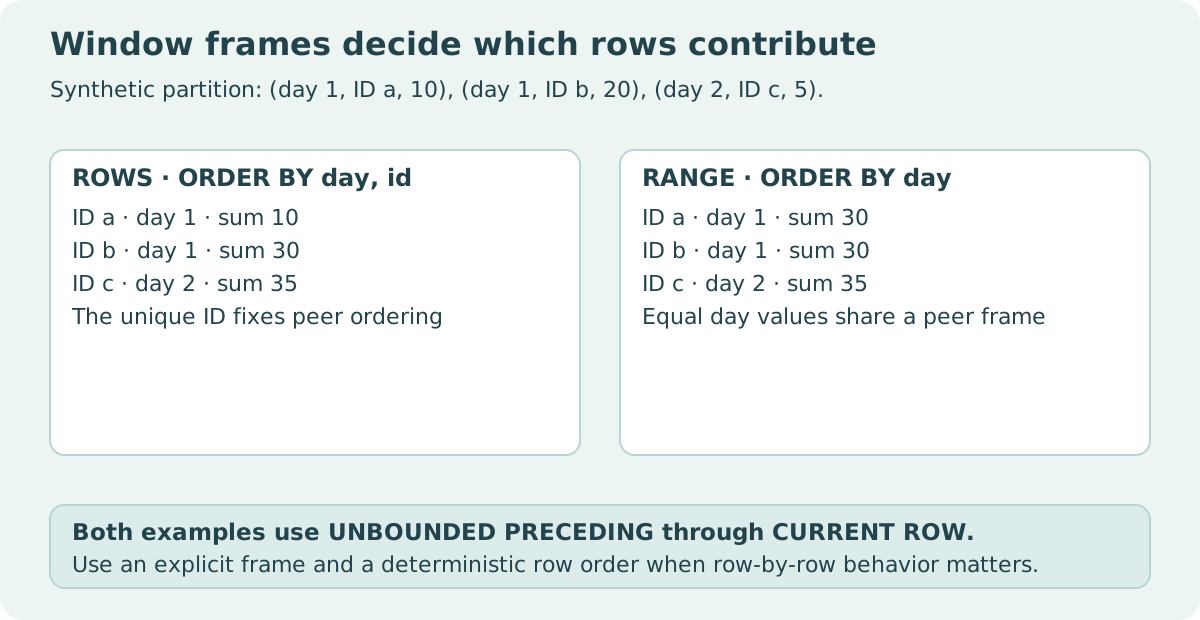
A running total jumps by thirty on the first displayed row, even though that row's amount is ten. The second row shows the same cumulative value. The query is not necessarily broken: both rows share the same ordering value, and the window's frame can include the whole peer group.
Window functions calculate across related records while preserving an output row for each record. That makes them useful for rankings, cumulative measures, and comparisons with previous events. It also makes partition, ordering, and frame choices part of the calculation contract.
Practical rule: define the population, establish a meaningful order with tie behavior, and write an explicit frame when the result depends on it. Window ordering and final presentation ordering are separate; neither should be left implicit when readers must reproduce the sequence.
Grouping collapses rows; windows preserve them
GROUP BY returns one aggregate row per group. A window aggregate attaches a calculation to each retained source row. If you join records before applying the window, duplicated source rows are still duplicated inputs to that calculation. A window does not repair an incorrect join grain.
PARTITION BY establishes separate populations. ORDER BY inside OVER supplies the ordering relevant to the window calculation. The frame describes which part of that ordered partition is considered for the current row by functions that use a frame.
| Clause | Question it answers | Example |
|---|---|---|
| PARTITION BY | Which rows belong to the same population? | Separate account balances |
| Window ORDER BY | In what order or peer grouping is the calculation defined? | Day, then event ID |
| Frame | Which ordered rows contribute for this row? | From first row through current row |
| Outer ORDER BY | How should results be presented? | Display by account, day, event ID |
The SQLite window reference documents the default frame as RANGE from the unbounded preceding boundary through the current row, with the usual peer-inclusive behavior. Ties in the ordering expression are therefore meaningful.
Reproduce the peer-group jump
import sqlite3

with sqlite3.connect(":memory:") as database:
    database.execute("CREATE TABLE sales(id INTEGER PRIMARY KEY, day INTEGER, amount INTEGER)")
    database.executemany("INSERT INTO sales VALUES (?, ?, ?)", [(1, 1, 10), (2, 1, 20), (3, 2, 5)])
    rows = database.execute("""
        SELECT id, day, amount,
               SUM(amount) OVER (ORDER BY day) AS peer_total,
               SUM(amount) OVER (
                   ORDER BY day, id
                   ROWS BETWEEN UNBOUNDED PRECEDING AND CURRENT ROW
               ) AS event_total
        FROM sales
        ORDER BY day, id
    """).fetchall()
assert rows == [(1, 1, 10, 30, 10), (2, 1, 20, 30, 30), (3, 2, 5, 35, 35)]
print(rows)
| Event ID | Day | Amount | Default peer total by day | Explicit event total |
|---|---|---|---|---|
| 1 | 1 | 10 | 30 | 10 |
| 2 | 1 | 20 | 30 | 30 |
| 3 | 2 | 5 | 35 | 35 |
The default calculation treats the two day-one events as peers. The explicit event calculation orders by day and unique ID, then advances one record at a time. Neither definition is universally superior. A day-level report may want peer totals; an event ledger may want an event sequence.
ROWS, RANGE, and GROUPS answer different boundary questions
ROWS describes record offsets. A frame of one preceding row through the current row includes at most two records, regardless of how far apart their timestamps are. RANGE uses ordering-value semantics; with numeric offsets in SQLite it requires a single ordering expression and applies its defined value boundary behavior. GROUPS counts peer groups.
A “last seven days” calculation is therefore not automatically equivalent to seven preceding rows. If multiple events occur per day or dates are missing, a row count and a calendar interval represent different populations. Choose a date representation and boundary contract deliberately before using numeric RANGE offsets.
import sqlite3

with sqlite3.connect(":memory:") as database:
    database.execute("CREATE TABLE readings(id INTEGER, day INTEGER, value INTEGER)")
    database.executemany("INSERT INTO readings VALUES (?, ?, ?)", [(1, 1, 10), (2, 2, 20), (3, 10, 30)])
    rows = database.execute("""
        SELECT id,
               SUM(value) OVER (
                   ORDER BY day, id ROWS BETWEEN 1 PRECEDING AND CURRENT ROW
               ),
               SUM(value) OVER (
                   ORDER BY day RANGE BETWEEN 1 PRECEDING AND CURRENT ROW
               )
        FROM readings ORDER BY day, id
    """).fetchall()
assert rows == [(1, 10, 10), (2, 30, 30), (3, 50, 30)]
print(rows)
At day ten, the previous record is day two. The two-record window totals fifty; the numeric one-day range totals thirty. This fixed fixture exposes the population difference without needing a large dataset or a performance claim.
Ranking functions have their own tie semantics
ROW_NUMBER assigns a sequential position within a partition. If its window ordering does not uniquely determine a sequence, the assignment among ties should not be treated as a stable business ordering. Add a meaningful tie-breaker when that distinction matters.
RANK leaves gaps after ties, while DENSE_RANK does not. Two equal first-place values can yield ranks one, one, three or dense ranks one, one, two. Adding a unique ID to the rank ordering would remove those ties, so do not automatically add a tie-breaker when the purpose is to rank equal measured values equally.
| Desired meaning | Appropriate ordering idea | Tie consequence |
|---|---|---|
| Stable event sequence | Measurement time plus unique event key | Each event has a distinct position |
| Equal scores share rank | Score alone | Peer scores share rank |
| Day-level cumulative measure | Day value | Same-day peers share the day total |
LAG and LEAD access positions relative to the partition's order. In SQLite, changing the frame does not change those functions' behavior. Most built-in window functions ignore frames; first_value, last_value, and nth_value are important exceptions. Read the function's actual contract instead of assuming every OVER expression uses its frame identically.
Last value can mean the current frame's last value
With a frame ending at the current row or its peer group, LAST_VALUE may return the last value currently inside that frame, rather than the final value of the entire partition. If the question asks for the partition's final value on every row, define a frame reaching unbounded following under a deterministic order.
This is a useful review question because it reveals whether the developer understands frame lifetime. A function name can sound global while the actual calculation is local to a frame. Write a tiny partition with known values and trace which records are included at each row.
Filter at the correct stage
A WHERE condition filters source rows before the window calculation. If you need to calculate rankings over a larger population and then select the top results, use a subquery or common table expression so the window is evaluated on the intended population first.
Similarly, missing amounts and duplicate records affect the calculation before formatting. SUM's treatment of missing values does not prove a ledger is complete. Include observation counts or a missing-value policy when incomplete measurements would change the interpretation.
The outer query should state output order explicitly. A window ORDER BY governs the calculation; it does not guarantee the order in which the final result rows are presented. A reproducible exported table needs both contracts.
Verify the meaning with small partitions
Test one row, tied order values, a gap in dates, multiple partitions, and an incomplete measurement. Compute expected results by hand. For a running total, distinguish event-based and peer-based expectations. For ranking, test whether ties should share a rank and whether gaps are expected.
Keep engine and version in the evidence. Window syntax looks similar across SQL products, but supported frames, numeric RANGE restrictions, and null-order behavior can differ. The two runnable examples establish SQLite results only.
Trace the window frames yourself
Why does the first displayed sale already have a cumulative total of 30? Download the tiny sales fixture and run both calculations locally. The pack includes separate SQL files, two CSV inputs, a Python runner, and an expected-results file. No database server or additional Python package is needed.
Before running it, mark the rows included for each event. The default peer-inclusive calculation returns 30, 30, 35; the explicit event calculation returns 10, 30, 35. Notice that their ordering contracts differ too: the event calculation adds a unique ID. A second fixture with days 1, 2, and 10 shows why the previous row is not necessarily the previous day. Change a day value, predict the new totals, and use the assertions to check your reasoning. These results describe SQLite, so verify another database engine separately.
Download the SQLite window-frame pack (ZIP). The README records the tested Python and SQLite versions and explains each expected column.
Sources and reproducibility
Primary references: SQLite window functions and SQLite SELECT processing. Both complete examples create in-memory databases, execute their own SQL, and assert exact results. The diagram and tables use the same original fixtures; no production database or timing benchmark is involved.