Today's outcomes
- Distinguish JSON text from Python objects.
- Use loads, dumps, load, and dump.
- Check schema-like requirements after parsing.
Before you start: Complete Day 24 and its practical challenge.
Understand the concept
JSON is an interchange format, not a Python object
JSON represents structured data as text. A Python dictionary is an object in a running program; its JSON representation is a string that can be saved or transmitted. Parsing turns that text into Python objects. Serialization turns suitable Python objects back into text. Keep those two directions explicit, because calling dictionary methods on unparsed JSON text is a common error.
JSON has objects, arrays, strings, numbers, booleans, and null. Python usually represents these as dictionaries, lists, strings, int or float, bool, and None. JSON object keys are strings. A Python tuple serializes as an array and parses back as a list; serialization does not preserve every Python type. Sets, paths, and date objects need an explicit representation before serialization.
Double quotes delimit JSON strings. Python's single-quoted dictionary display is not automatically valid JSON. A trailing comma accepted in some Python literals is not accepted by the JSON parser. Never repair a document by replacing every quote: apostrophes inside text and escaped quotation marks make that approach unreliable.
Choose the function by the boundary
json.loads(text) parses a string. json.dumps(value) returns a string. Their names end in s because these operations work with a string boundary. json.load(file) and json.dump(value, file) work through an open file object. Use a context manager and an explicit UTF-8 encoding when writing a text file.
indent=2 makes a document easier to inspect. ensure_ascii=False allows Unicode characters to appear directly rather than as escape sequences. Both are presentation choices; neither establishes that the data meets your application rules. Python permits nonfinite float output by default through its JSON encoder. Setting allow_nan=False rejects those values during encoding when you require standard JSON numbers.
Valid syntax does not prove valid records
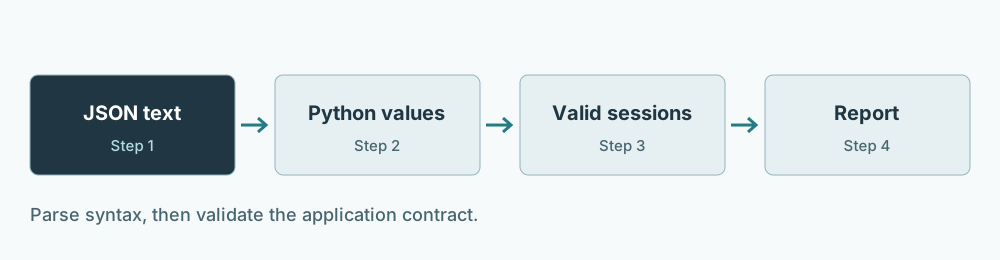
A parser can accept a top-level integer even when your application requires a list of session records. It can accept negative minutes or a blank topic. Separate parsing errors from shape errors, then apply field rules deliberately. This boundary is a good place to use the validation and exception handling from Days 10 and 17.
For this lesson, a session has exactly two keys: topic and minutes. A topic is nonempty text after stripping surrounding whitespace. Minutes is an actual integer from 0 through 240. Because bool is a subclass of int, isinstance(True, int) is true; use type(value) is int when Boolean minutes must be rejected. Return new dictionaries so validation does not quietly modify the caller's records.
Worked example
import json

text = '[{"topic": "functions", "minutes": 30}, {"topic": "review", "minutes": 0}]'
sessions = json.loads(text)
assert isinstance(sessions, list)
assert sessions[1]["minutes"] == 0
rendered = json.dumps(sessions, indent=2, ensure_ascii=False, allow_nan=False)
assert json.loads(rendered) == sessions
print(rendered)

try:
    json.loads('{"minutes": 30,}')
except json.JSONDecodeError as error:
    print("Invalid JSON at line", error.lineno, "column", error.colno)
else:
    raise AssertionError("A trailing comma should fail")
| Boundary | Input | Output | What it establishes |
|---|---|---|---|
| Parse | JSON text | Python list | Syntax can be decoded |
| Validate | Python list | Clean session records | Application rules hold |
| Serialize | Clean records | JSON text | Supported values can be represented |
| Parse again | Serialized text | New Python objects | Round-trip value agreement |
The zero-minute review is deliberately present. A check such as if not minutes would incorrectly treat it as missing. Syntax errors report a location in the document, but a business-rule error should identify the record or field. Different messages help you repair the correct layer.
Guided practice
- Predict: serialize a tuple containing two numbers, then parse the result. Explain why the returned type is a list even though the values agree.
- Modify: add a topic containing an accented character and compare ensure_ascii True and False. Parse both strings and verify that the Python values are equal.
- Reconstruct: write a small validator for a dictionary containing a name and an enabled flag. Accept only a string and a bool, and demonstrate a valid JSON document with the wrong application shape.
Use a temporary directory when practicing file round trips. Open a path for writing, call dump, close it, reopen for reading, and call load. Do not call loads with a Path object or assume a successful write means the next process can interpret the records.
Daily challenge
Implement decode_sessions(text) and encode_sessions(records). Both must apply the same validation rules. Accept an empty list. Reject extra keys, missing keys, a non-list root, a non-dictionary record, blank topics, Boolean minutes, and minutes outside the range. Keep record order. Do not mutate input records. Use ValueError for this exercise's invalid documents or data, including malformed JSON.
| Case | Expected result |
|---|---|
| Empty array | Empty list |
| Topic with surrounding spaces | Cleaned topic |
| Minutes 0 and 240 | Accepted |
| Minutes true, -1, or 241 | ValueError |
| Object instead of array | ValueError |
| Trailing comma | ValueError with syntax context |
Try the challenge before opening the reference. Test serialization as well as parsing; otherwise bad records can enter a saved file through the reverse boundary.
Reference solution
Compare after attempting the challenge
import json

def validate_sessions(records):
    if not isinstance(records, list):
        raise ValueError("sessions must be an array")
    clean = []
    for index, record in enumerate(records):
        if not isinstance(record, dict) or set(record) != {"topic", "minutes"}:
            raise ValueError(f"record {index}: expected topic and minutes")
        topic = record["topic"]
        minutes = record["minutes"]
        if not isinstance(topic, str) or not topic.strip():
            raise ValueError(f"record {index}: topic must be nonempty text")
        if type(minutes) is not int or not 0 <= minutes <= 240:
            raise ValueError(f"record {index}: minutes must be an integer from 0 to 240")
        clean.append({"topic": topic.strip(), "minutes": minutes})
    return clean

def decode_sessions(text):
    try:
        records = json.loads(text)
    except json.JSONDecodeError as error:
        raise ValueError(f"invalid JSON at line {error.lineno}, column {error.colno}") from error
    return validate_sessions(records)

def encode_sessions(records):
    return json.dumps(validate_sessions(records), indent=2,
                      ensure_ascii=False, allow_nan=False)

original = [{"topic": " functions ", "minutes": 30}, {"topic": "review", "minutes": 0}]
clean = decode_sessions(encode_sessions(original))
assert clean == [{"topic": "functions", "minutes": 30}, {"topic": "review", "minutes": 0}]
assert original[0]["topic"] == " functions "
assert decode_sessions("[]") == []
for bad in ['{}', '[{"topic":"x","minutes":true}]',
            '[{"topic":" ","minutes":30}]', '[{"topic":"x","minutes":241}]',
            '[{"topic":"x","minutes":0,"extra":1}]', '[1]', '[{"topic":"x"}]', '{bad']:
    try:
        decode_sessions(bad)
    except ValueError:
        pass
    else:
        raise AssertionError("Invalid case was accepted")
print("JSON syntax, shape, fields, and round trip passed")
Validation precedes encoding, so the same field policy protects both boundaries. The original data remains available for comparison. Strictly rejecting unknown fields is this exercise's policy; another application could allow extensions, but it should state that choice and test it.
Debug and explain
If a decoded value has no expected method, inspect its type and the document's top-level shape. If a valid record disappears, look for truthiness checks that conflate zero with absence. If a file fails after manual editing, inspect the reported JSON location before changing the schema. Explain why a round-trip test alone cannot prove semantic validity: an invalid negative duration can survive a perfectly successful round trip.
Review and next step
Save your accepted and rejected fixtures with the two boundary functions. You now have a repeatable approach for structured text: parse, validate, transform, and serialize. Day 26 uses a different parser for HTML and keeps missing source fields visible in an extraction audit.
Sources and verification
Original teaching examples checked with Python 3.12.14. Library behavior reviewed against these primary references on October 3, 2026. Day 26's examples also use Beautiful Soup 4.14.3.
Check your understanding
Five questions, 20 points each. Pass at 85% or above, which requires all five correct. Feedback explains each answer; revise the lesson and retry when needed.
Review your practical work
Check these statements after running your own challenge. This is your self-review; the website does not execute or assess your Python code.
Pass the knowledge check and finish the practical self-review to save completion.