Python Datetime and Time Zones: UTC, ZoneInfo, and DST Pitfalls
Manage Python datetime with UTC and ZoneInfo. Understand naive vs aware values, time zone conversion, timestamp units, and ambiguous or missing DST times.
Checked on October 2, 2026. Examples use Python 3.10 or later with an available IANA time-zone database. Historical DST dates are test cases, not predictions of future zone rules.
A log records 2026-10-02 19:30:00. Did the event occur at 19:30 in Jakarta, Bangkok, London, or UTC? Without zone context, the text describes a calendar clock reading but not a unique global instant. Different interpretations can change event order, durations, and daily reports.
Short answer: use timezone-aware datetimes for events. Normalize events to UTC when comparing or storing them under the system contract, then convert for user display. For recurring schedules expressed in local time, also retain the named zone and recurrence rules. UTC alone does not describe the intention "every Monday at nine in this city."
Distinguish calendar values, instants, and schedules
These often share one column even though a birthday, payment receipt time, and weekly class have different meanings. Automatically adding UTC to everything does not resolve data-modeling decisions.
| Requirement | Representation to consider | Question to check |
|---|---|---|
| Birthday | Calendar date | Is a clock time actually needed? |
| Log event | Timestamp with offset or UTC | Do systems identify the same event? |
| Daily-report boundary | Date and business zone | Midnight for which office? |
| Monday class at 09:00 | Local time, named zone, recurrence rule | Should local clock time remain fixed when offsets change? |
| Process duration | Appropriate duration measurement | Can system-clock changes affect it? |
This is editorial modeling guidance. Begin with a column's meaning rather than the easiest format to parse. Document source zones when receiving external data. If the source omits one, preserve the uncertainty or correct the contract instead of guessing from server location.
Naive and aware values in Python
The datetime documentation distinguishes naive and aware objects. Aware objects provide sufficient information through tzinfo to relate their time to another zone; naive objects do not. Complete date and time digits do not automatically make an object aware.
For events, inspect timezone information before combining systems. Some functions interpret naive values as the machine's local time. Output appearing correct on a laptop can change on a server configured differently.
This standalone example converts a Jakarta event to UTC. It uses timezone.utc for Python 3.10 compatibility. The datetime.UTC alias is available from Python 3.11.
from datetime import datetime, timezone
from zoneinfo import ZoneInfo

jakarta = datetime(2026, 10, 2, 19, 30,
                   tzinfo=ZoneInfo("Asia/Jakarta"))
utc = jakarta.astimezone(timezone.utc)

assert jakarta.utcoffset().total_seconds() == 7 * 3600
assert utc.isoformat() == "2026-10-02T12:30:00+00:00"
assert jakarta.timestamp() == utc.timestamp()
print(jakarta.isoformat())
print(utc.isoformat())
The clock reading changes from 19:30 to 12:30, but the represented event remains the same. The timestamp assertion verifies that property. We do not manually subtract seven hours; the API converts using zone information.
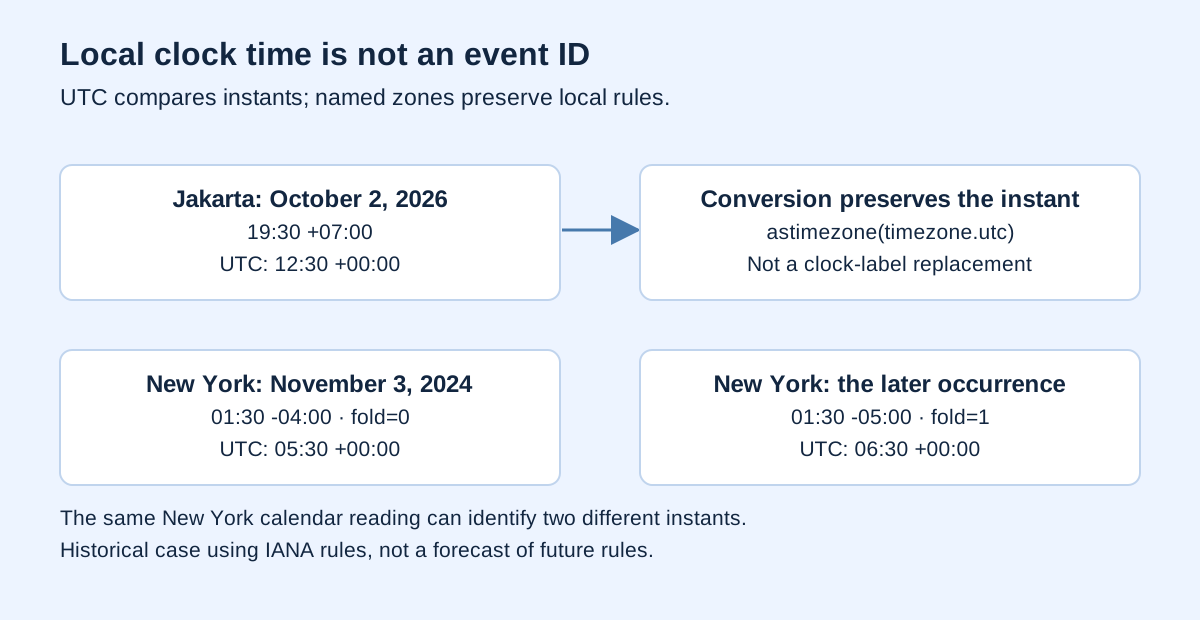
replace and astimezone do different jobs
astimezone() converts an event's representation. replace(tzinfo=...) changes its timezone label without adjusting clock digits. Relabeling Jakarta 19:30 as UTC 19:30 represents a different event.
Attaching a zone can be appropriate when you know where a naive local reading originated. It does not resolve ambiguous or nonexistent times. This example uses Jakarta on a date without a DST transition under the tested database rules.
from datetime import datetime, timezone
from zoneinfo import ZoneInfo

raw = datetime(2026, 10, 2, 19, 30)
local = raw.replace(tzinfo=ZoneInfo("Asia/Jakarta"))
converted = local.astimezone(timezone.utc)
wrong_label = local.replace(tzinfo=timezone.utc)

assert converted.hour == 12
assert wrong_label.hour == 19
assert wrong_label.timestamp() - converted.timestamp() == 7 * 3600
Do not use replace(tzinfo=None) as a way to "store UTC": it removes timezone information. If a database requires a particular representation, define the boundary contract and test writing and reading. Readers should know whether an offset-free value means UTC by contract, not by appearance.
A named zone is different from an offset
+07:00 states a relationship to UTC for that representation. An IANA name such as America/New_York identifies rules that can vary by date. PEP 615 explains IANA support through zoneinfo; IANA explains database updates following political rule changes.
For one historical event, an explicit offset helps identify its instant. For recurring New York classes, a named zone lets the local clock follow local rules. Treating −05:00 as a permanent schedule rule can move the class's local hour when the region uses another offset.
Design columns around the requirement: perhaps an event's UTC timestamp, a user's display zone, and a schedule's original zone. Do not maintain several vaguely defined columns that contradict each other. Specify the source of truth and when derived values are calculated.
DST: one local clock time can identify two instants
During New York's backward transition on November 3, 2024, 01:30 occurred twice. PEP 495 introduces fold to distinguish readings in a repeated interval. Zero selects the earlier occurrence; one selects the later occurrence.
from datetime import datetime, timezone
from zoneinfo import ZoneInfo

zone = ZoneInfo("America/New_York")
earlier = datetime(2024, 11, 3, 1, 30, tzinfo=zone, fold=0)
later = datetime(2024, 11, 3, 1, 30, tzinfo=zone, fold=1)
u0 = earlier.astimezone(timezone.utc)
u1 = later.astimezone(timezone.utc)

assert u0.isoformat() == "2024-11-03T05:30:00+00:00"
assert u1.isoformat() == "2024-11-03T06:30:00+00:00"
assert (u1 - u0).total_seconds() == 3600
print(earlier.isoformat(), later.isoformat())
The calendar clock digits match, but offsets differ. To measure elapsed duration between instants, the example converts to UTC before subtraction. Python datetime arithmetic has particular rules when objects share the same tzinfo; wall-clock subtraction is not appropriate for every duration requirement.
Scheduling interfaces need an ambiguity policy. Ask which occurrence is intended, use genuinely available context, or reject until clarified. Silently choosing fold=0 is not neutral for all users. Retain the choice so schedules remain reproducible.
Some local clock times never occur
When clocks move forward, an interval is skipped. Attaching ZoneInfo does not automatically prove that a local reading exists. PEP 495 discusses gaps and does not require strict constructor validation.
For batches, pandas tz_localize provides ambiguous and nonexistent policies. This example explicitly rejects the missing New York time on March 10, 2024 rather than silently moving a user's appointment.
import pandas as pd

local_times = pd.DatetimeIndex(["2024-03-10 02:30:00"])
try:
    local_times.tz_localize("America/New_York",
                            ambiguous="raise", nonexistent="raise")
except Exception as error:
    assert type(error).__name__ == "NonExistentTimeError"
    print("Local time rejected under the explicit policy")
else:
    raise AssertionError("The missing local time should be rejected")
Shifting, marking missing, or rejecting input should follow business needs. A disclosed shift may be acceptable for an informal reminder. Silently modifying raw timestamps can undermine an event-order audit. Preserve originals and transformation reasons.
Seconds and milliseconds are different units
Unix timestamps need explicit units. Many JavaScript APIs use milliseconds while other functions expect seconds. Digit-count heuristics can assist inspection but do not replace a data contract. Old dates, negative values, and fixtures can defeat guesses.
pandas to_datetime documents unit and utc. Choose unit="s" or unit="ms" for the source. For naive text, utc=True interprets it as UTC; it does not discover that the text was a Jakarta clock reading. Localize the source zone first when that is its meaning.
Use the Noetrion Timestamp Converter to compare units and view named zones. Check the displayed unit before copying results. In pipelines, test that equivalent second and millisecond values represent the same event.
Exchange formats and daily reports
RFC 3339 defines an internet timestamp format including offset information. 2026-10-02T12:30:00Z represents UTC, while 2026-10-02T19:30:00+07:00 represents the same example event. Neither string includes an IANA zone name; retain that separately for schedules when needed.
For Jakarta daily sales, define day boundaries in Jakarta and compare events through UTC. Do not slice a UTC date string and label it the local business date. Near-midnight events can fall on different dates across zones.
Where suitable, use an inclusive start and exclusive end: the start of this day up to, but not including, the next day's start. In DST zones, do not assume every calendar day has exactly 24 elapsed hours. Calendar boundaries and elapsed durations are different concepts.
Test checklist and environment limits
| Case | Required outcome |
|---|---|
| Jakarta to UTC and back | Same instant; original local reading restored |
| Naive input without a source zone | Rejected or marked unknown |
| Both folds of a repeated hour | Different UTC instants |
| Input inside a DST gap | Explicit policy applied |
| Equivalent seconds and milliseconds | Identical event |
| Around-midnight events | Correct business date for the selected zone |
The zoneinfo documentation explains system data and the tzdata package fallback. For ZoneInfoNotFoundError, check the target environment's database availability. Record Python and pandas versions and the timezone-data source; rules can change.
Examples were tested in the writing environment. Historical results do not guarantee future schedule rules. For missing packages, start with ModuleNotFoundError diagnosis, then rerun checks on the server that will execute the application.