Pandas Merge Validation: Stop Duplicate Rows and Audit Missing Matches
Use Pandas merge validation to prevent duplicate rows, audit unmatched keys, handle nulls deliberately, and reconcile totals with reproducible examples.
Checked on October 3, 2026. Examples were executed with Python 3.12.14 and Pandas 2.2.3. All orders, customers, and amounts below are synthetic; they illustrate correctness, not business performance.
A sales report starts with five orders totaling 175 units. After attaching customer regions, it contains seven rows totaling 225. The merge completed successfully, every column has a plausible name, and the chart looks ordinary. Nevertheless, the report now counts two orders twice.
This is a common data problem: a join can be syntactically valid while violating the intended relationship between tables. The useful question is not simply whether the code ran. It is whether each input record produced the number of output records the analysis expected.
Short answer: write down the grain of each table, specify the join keys explicitly, use validate to enforce the expected relationship, and inspect unmatched records with indicator. Reconcile record identity and totals separately. A clean row count cannot establish that a customer was assigned the correct region.
Describe the relationship before choosing the join
The grain is what one row represents. In this example, an order row represents one order, while a customer lookup row should represent one current customer. Several orders can belong to one customer, so enriching orders from the lookup is a many-to-one operation.
A customer history table has a different grain: perhaps one customer and one effective date range. Calling that table a lookup does not make its customer IDs unique. You may need an effective-date condition, an approved current-record filter, or additional keys before it can enrich an order without multiplication.
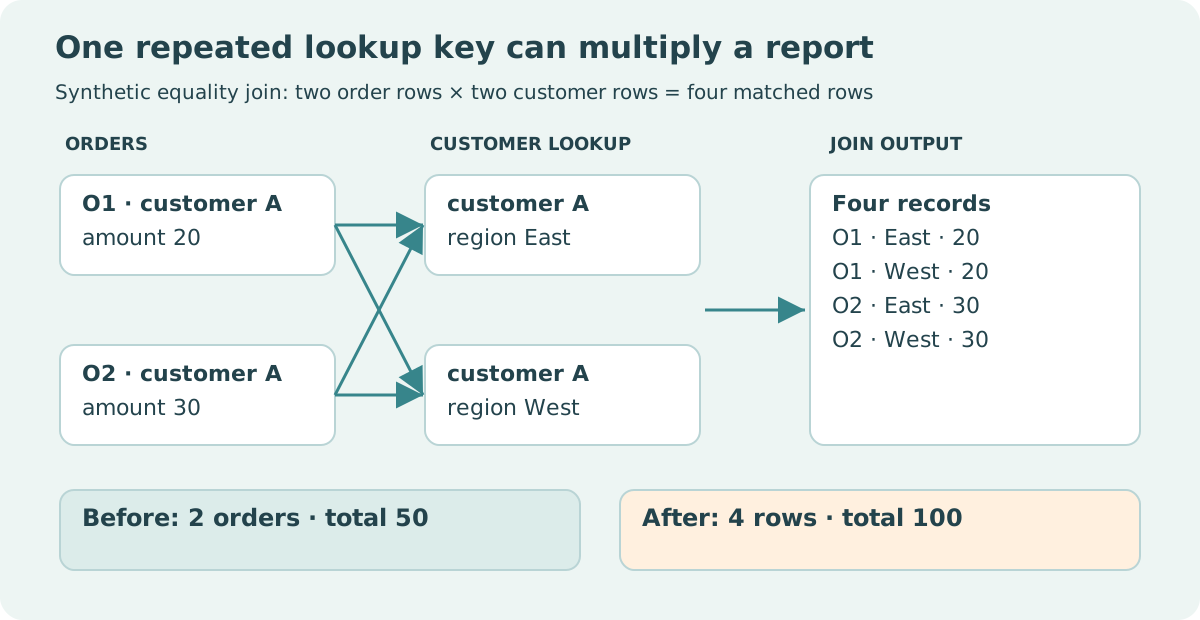
For an equality join, if a key appears m times on the left and n times on the right, its matched output contains m × n pairs. The Pandas merging guide explains this Cartesian-product behavior. It is useful for legitimate pair generation and dangerous when a report expects one output row per order.
| Intended relationship | Pandas validation | What must be unique? | Example |
|---|---|---|---|
| One to one | one_to_one |
Both sets of join keys | One invoice matched to one payment record |
| One to many | one_to_many |
Left join keys | Customer records expanded to their orders |
| Many to one | many_to_one |
Right join keys | Orders enriched with a customer lookup |
| Many to many | many_to_many |
Neither side is checked | Deliberate combinations between repeated keys |
The setting many_to_many does not verify that the multiplication is sensible. According to the merge API, this setting permits the relationship without uniqueness checks. It should not be used merely to silence an inconvenient validation error.
Reproduce the incorrect result
Run this complete example in an environment with Pandas installed. String-typed IDs keep the key representation explicit. The amount column uses integer units so the reconciliation is exact.
import pandas as pd

orders = pd.DataFrame({
    "order_id": ["O1", "O2", "O3", "O4", "O5"],
    "customer_id": pd.array(["A", "A", "B", "C", None], dtype="string"),
    "amount": [20, 30, 50, 70, 5],
})
bad_lookup = pd.DataFrame({
    "customer_id": pd.array(["A", "A", "B", None], dtype="string"),
    "region": ["East", "West", "North", "Unknown"],
})

raw = orders.merge(bad_lookup, on="customer_id", how="left", indicator=True)
assert len(orders) == 5 and orders["amount"].sum() == 175
assert len(raw) == 7 and raw["amount"].sum() == 225
assert raw.loc[raw["order_id"].eq("O5"), "region"].item() == "Unknown"
print(raw[["order_id", "customer_id", "region", "amount", "_merge"]])

try:
    orders.merge(bad_lookup, on="customer_id", how="left", validate="many_to_one")
except pd.errors.MergeError:
    print("Rejected: customer keys are not unique on the right")
else:
    raise AssertionError("The invalid lookup should have been rejected")
The two orders for A each match two lookup rows. Their original amounts, 20 and 30, each appear twice. The additional 50 explains the increase from 175 to 225. The order for B appears once, C remains unmatched, and the missing customer key matches the missing lookup key.
Treat missing keys as a separate policy decision
Pandas can match null join keys to other null join keys. Its merge documentation explicitly flags this difference from ordinary SQL equality joins. A missing customer ID therefore does not automatically mean an unmatched order in a Pandas merge.
In the fixture, O5 receives the region “Unknown.” That label looks harmless, but _merge == 'both' would count O5 as a successful match. If the report measures customer identification, matching two missing IDs is not evidence that the customer was identified.
A reasonable enrichment policy is to retain orders with missing IDs, exclude missing IDs from the customer lookup, and report them separately. Another dataset may require rejecting such orders before processing. Choose the rule from the data contract and disclose its effect on coverage.
Avoid filling every missing key with the same sentinel before joining. Doing so explicitly makes all those records share a join key. If both tables contain several sentinel rows, multiplication follows. A sentinel can be appropriate for a documented “unassigned” dimension member, but that is a designed relationship rather than a generic cleaning step.
Repair the lookup using evidence, then validate
The next example uses a separate, approved lookup fixture. It does not arbitrarily keep the first A row. In real work, determine whether East or West is correct using the authoritative customer record or the order's effective date.
import pandas as pd

orders = pd.DataFrame({
    "order_id": ["O1", "O2", "O3", "O4", "O5"],
    "customer_id": pd.array(["A", "A", "B", "C", None], dtype="string"),
    "amount": [20, 30, 50, 70, 5],
})
approved_lookup = pd.DataFrame({
    "customer_id": pd.array(["A", "B", "D"], dtype="string"),
    "region": ["East", "North", "West"],
})
usable_lookup = approved_lookup.loc[approved_lookup["customer_id"].notna()]
assert orders["order_id"].notna().all() and orders["order_id"].is_unique

joined = orders.merge(
    usable_lookup, on="customer_id", how="left",
    validate="many_to_one", indicator="match_status",
)
assert len(joined) == len(orders)
assert joined["order_id"].is_unique
assert set(joined["order_id"]) == set(orders["order_id"])
assert joined["amount"].sum() == orders["amount"].sum() == 175

matched = joined["match_status"].eq("both")
assert int(matched.sum()) == 3
assert joined.loc[matched, "amount"].sum() == 100
assert joined.loc[~matched, "amount"].sum() == 75
print(joined.loc[~matched, ["order_id", "customer_id", "amount"]])

left_keys = orders.loc[orders["customer_id"].notna(), ["customer_id"]].drop_duplicates()
key_audit = left_keys.merge(
    usable_lookup[["customer_id"]], on="customer_id", how="outer",
    validate="one_to_one", indicator=True,
)
assert key_audit.loc[key_audit["_merge"].eq("right_only"), "customer_id"].tolist() == ["D"]
drop_duplicates is used here only to build a set of observed left keys for the key audit. It does not repair the customer lookup or discard orders. The outer audit finds D, which exists in the lookup but has no order in this batch. A left join alone cannot reveal that unused right-hand key.
Report coverage with the denominator attached
The corrected result preserves all five orders and all 175 units. Three orders match, but two remain unassigned. “The join is valid” and “the data is complete” are different conclusions.
| Coverage measure | Calculation in this fixture | Result | What it describes |
|---|---|---|---|
| Order match coverage | 3 matched orders / 5 total orders | 60% | Fraction of order rows enriched |
| Known-ID coverage | 2 matched distinct IDs / 3 observed nonmissing IDs | About 66.67% | Fraction of identifiable customers represented |
| Amount match coverage | 100 matched units / 175 total units | About 57.14% | Share of order amount assigned a region |
| Missing-ID share | 1 missing-ID order / 5 total orders | 20% | Orders requiring identification work |
None of these measures is a universal “join accuracy” score. An incorrect East assignment could count as matched in all three coverage measures. They describe availability of a key match under the chosen policy, while field correctness requires separate evidence.
When grouping by region, retain an explicit unassigned category or a separate exception total. Dropping rows with missing regions can make a regional chart total 100 even though orders total 175. That might be an intentional analysis of assigned orders, but its title and denominator should say so.
Key preparation can create new problems
Specify on, or left_on and right_on, even when column names match. An implicit merge can use shared columns you did not intend as keys. A new “status” column in both inputs should not silently change the relationship.
Preserve identifiers as identifiers during import. Converting “00123” to an integer loses information that converting back to a string cannot restore. The Pandas CSV documentation documents dtype and missing-value parsing options. Decide whether tokens such as “NA” are legitimate IDs before accepting default missing-value interpretation.
Whitespace trimming, case folding, and Unicode normalization can make formerly different keys equal. Apply a documented policy to both sides and audit collisions after transformation. A database where “ab” and “AB” are distinct accounts cannot safely adopt a case-insensitive join simply because it improves coverage.
Compound keys deserve the same discipline. A customer ID may be unique only within a tenant; a product code may be unique only within a supplier. Validate the complete key combination. Do not assume that each component must be individually unique.
What to keep with a production report
Retain source versions, the declared grains, key preparation rules, duplicate-key exceptions, missing-key counts, and match coverage. Record the input and output order counts and amount totals. These small artifacts make a later investigation much more useful than “merge succeeded.”
For chunked input, checking lookup uniqueness once is practical, but checking order uniqueness separately in each chunk does not establish global order uniqueness. The same order can occur in two chunks. See correct aggregation of large CSV files for the related distinction between local and global checks.
An effective acceptance rule for this example is concrete: exactly one output row per order, all order IDs retained, the total preserved, no missing lookup keys used for identification, and unmatched amounts reported. These checks still do not select the correct historical customer record; that remains part of the data contract.
Reproduce the merge failure on your computer
A merge that runs without an exception can still change the meaning of a report. This download gives you the five orders, conflicting customer lookup, approved lookup, and runnable checks used in this guide. Open the CSV files first and predict which orders will multiply. Then run the script and compare its JSON output with the supplied expected result.
The checks trace 175 units through the incorrect 225-unit result and back to a reconciled total. They also expose a less obvious problem: Pandas initially matches the two missing keys. The corrected example keeps that order unmatched and reports its amount. The approved lookup is a separate synthetic fixture; the script never chooses between conflicting regions by keeping the first row. A valid relationship and preserved total still cannot establish that a region is factually correct.
Download the merge reproduction pack (ZIP). Requires pandas; tested versions, instructions, and limitations are in the README.
Sources and reproducibility
Primary references checked on October 3, 2026:
- Pandas 2.2 merge API: validation, indicators, and null-key behavior.
- Pandas 2.2 merging guide: join relationships and duplicate-key expansion.
- Pandas 2.2 read_csv API: explicit ID types and missing-value parsing.
Both Python blocks are standalone. The totals and percentages are calculated from the published fixture. No customer data, timing benchmark, or estimated prevalence of join errors is used.