SQL NULL Explained: Correct Filters, Counts, Averages, and Joins
Understand SQL NULL with tested SQLite examples. Avoid NOT IN traps, misleading averages, and left join filters that silently remove unmatched records.
Checked on October 3, 2026. Examples were tested using Python 3.12.14 and its SQLite library. The fixtures are synthetic. SQL dialects differ, so SQLite-specific details are identified rather than assumed to apply everywhere.
A report says there are three transactions but only two amounts. Another report excludes an entire customer list after a new exclusion row appears. A third uses a left join yet still loses customers without payments. The common issue is how the queries treat NULL.
NULL represents the absence of a value in these examples. It is not an ordinary zero, empty string, or value equal to every other missing value. It changes the result of comparisons and which rows an aggregate includes.
Short answer: use IS NULL for a missing-value test, attach a denominator to every count and average, prefer a carefully defined NOT EXISTS for exclusion queries with nullable inputs, and place outer-join conditions according to the rows you intend to retain. Replacing missing values with zero is a modeling choice, not a neutral formatting step.
A comparison can have an unknown result
For ordinary comparisons, a missing operand generally produces an unknown result, represented by NULL. The expression NULL = NULL does not establish equality. Likewise, NULL <> 1 does not establish that the missing value differs from one.
SQLite represents true and false expression results as 1 and 0 in these examples. Its expression documentation specifies NULL behavior for operators. The query below can run directly in SQLite or through a client connected to SQLite.
SELECT
    NULL = NULL AS missing_equals_missing,
    NULL <> 1 AS missing_differs_from_one,
    NULL IS NULL AS is_missing,
    1 AND NULL AS true_and_unknown,
    0 AND NULL AS false_and_unknown,
    1 OR NULL AS true_or_unknown,
    0 OR NULL AS false_or_unknown,
    NOT NULL AS not_unknown;
| Expression | SQLite result | Interpretation |
|---|---|---|
NULL = NULL |
NULL | Equality cannot be established by this comparison |
NULL <> 1 |
NULL | Inequality cannot be established either |
NULL IS NULL |
1 | The missing-value test succeeds |
1 AND NULL |
NULL | An unknown second condition can change the outcome |
0 AND NULL |
0 | A false first condition already makes the conjunction false |
1 OR NULL |
1 | A true first condition already makes the disjunction true |
0 OR NULL |
NULL | The unknown second condition can change the outcome |
NOT NULL |
NULL | Negating an unknown result leaves it unknown |
These are logical results, not instructions about evaluation order or short-circuit execution in every SQL engine. Write expressions whose meaning is correct without depending on the engine skipping a particular function call.
In a filter, WHERE amount > 0 retains positive known amounts and excludes unknown amounts. WHERE NOT (amount > 0) still does not retain unknown amounts: negating unknown does not turn it into true. To include missing amounts intentionally, write that policy explicitly, such as amount <= 0 OR amount IS NULL.
Count rows, known values, and missing values separately
Consider three amounts: 10, NULL, and 0. There are three rows, two known amounts, and one missing amount. The known values sum to 10 and average 5. Treating the missing amount as zero changes the average to about 3.33.
WITH sales(id, amount) AS (
    VALUES (1, 10), (2, NULL), (3, 0)
)
SELECT
    COUNT(*) AS row_count,
    COUNT(amount) AS known_amount_count,
    COUNT(*) - COUNT(amount) AS missing_amount_count,
    SUM(amount) AS known_total,
    AVG(amount) AS known_average,
    AVG(COALESCE(amount, 0)) AS zero_imputed_average
FROM sales;
The result is (3, 2, 1, 10, 5.0, approximately 3.3333333333). The SQLite aggregate documentation distinguishes COUNT(*), which counts rows, from COUNT(expression), which counts non-NULL values. AVG operates on non-NULL inputs.
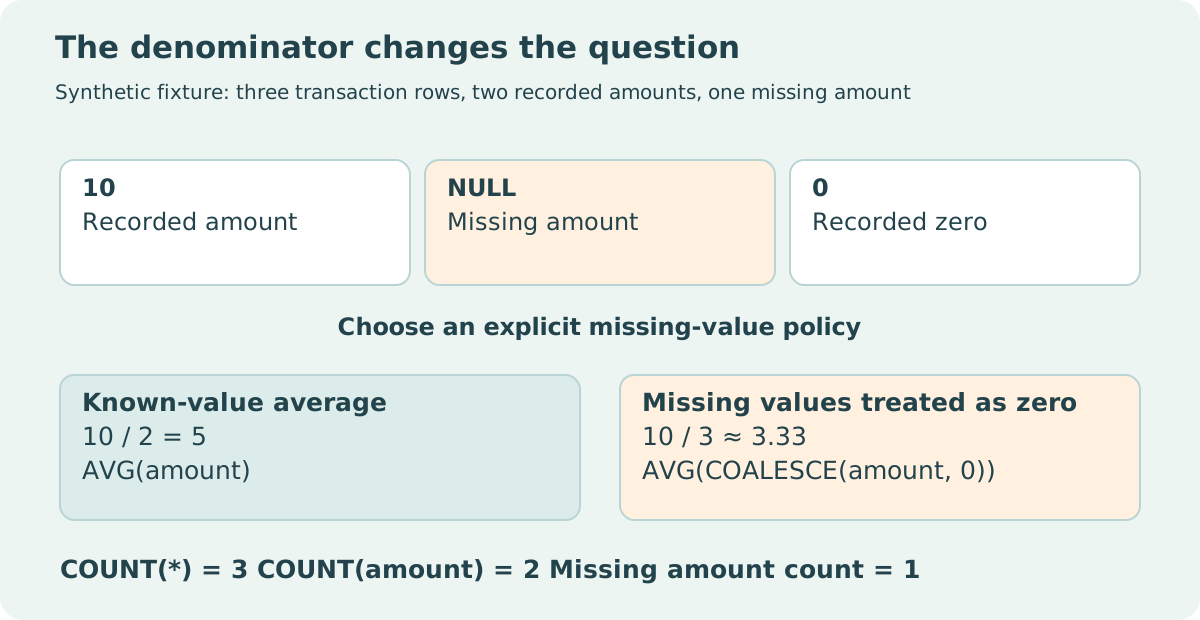
A report labeled “average amount per transaction” is ambiguous when some transaction amounts are unknown. It might mean the average among transactions with recorded amounts, or a quantity computed across all transactions under an imputation rule. State both the known-value count and total row count so readers can assess coverage.
Missing values can also have different causes: not collected, not applicable, withheld, or a failed import. A single NULL column does not preserve those distinctions. Add a reason field when the distinction affects analysis. The database cannot infer the missingness mechanism from the placeholder alone.
Keep display substitution separate from analysis
COALESCE returns the first non-NULL argument. It is useful for a display label such as “Not recorded.” For numerical analysis, choosing zero changes the dataset's meaning. Zero units sold is observed inactivity; an unknown unit count is incomplete evidence.
Changing AVG(amount) to AVG(COALESCE(amount, 0)) may leave a chart free of blanks while biasing its interpretation. Similarly, COALESCE(SUM(amount), 0) can turn an unknown or empty result into a displayable zero. Whether that is acceptable depends on the report's contract.
SQLite's SUM returns NULL when there are no non-NULL inputs; its total function returns 0.0 in that situation. total is a SQLite convenience and should not be assumed available in another engine. When portability matters, use supported expressions and document the intended empty-input behavior.
An aggregate without GROUP BY can return one result row even when the input is empty. An ordinary grouped query over an empty table has no groups to return. Creating a dimension table and left joining facts can produce explicit categories with no matching facts, which is a different operation again.
Why NOT IN can exclude everything
Suppose customer IDs 1, 2, and 3 are candidates, and the exclusion set contains 2 and NULL. Customer 2 is excluded as intended. For 1 and 3, the query cannot establish that they differ from the unknown exclusion value, so NOT IN yields unknown and the filter does not retain them.
WITH candidates(id) AS (VALUES (1), (2), (3)),
excluded(id) AS (VALUES (2), (NULL))
SELECT id
FROM candidates
WHERE id NOT IN (SELECT id FROM excluded);
This query returns no rows. The following query encodes a more specific policy: exclude a candidate only when a matching known ID exists in the exclusion table.
WITH candidates(id) AS (VALUES (1), (2), (3)),
excluded(id) AS (VALUES (2), (NULL))
SELECT c.id
FROM candidates AS c
WHERE NOT EXISTS (
    SELECT 1 FROM excluded AS e WHERE e.id = c.id
)
ORDER BY c.id;
It returns 1 and 3. EXISTS asks whether its subquery returns a row; the selected value 1 is just a conventional placeholder. The correlated equality still has ordinary NULL semantics.
If candidate IDs can also be NULL, this version retains those candidates because no equality match is found. If missing candidate IDs are invalid, add c.id IS NOT NULL. If the business policy treats missing IDs as matching each other, implement an explicit null-safe condition supported by your engine. NOT EXISTS provides a clearer structure; it does not choose the missing-ID policy for you.
An empty exclusion subquery is another edge case. In SQLite, NOT IN against an empty set is true even for a NULL left operand. Avoid broad rules such as “NULL always makes NOT IN unknown.” The contents of the set matter, and empty literal lists also have dialect-specific syntax rules.
A left join can lose its unmatched rows afterward
A left join preserves unmatched left rows by supplying NULLs for the right-hand columns. A subsequent WHERE condition can remove those rows. The SQLite SELECT documentation explains that outer-join extension occurs after ON conditions and before WHERE filtering.
Here is a complete Python experiment showing both queries against the same fixture:
import sqlite3

with sqlite3.connect(":memory:") as db:
    db.executescript("""
        CREATE TABLE customers(id INTEGER PRIMARY KEY);
        CREATE TABLE payments(id INTEGER PRIMARY KEY, customer_id INTEGER, status TEXT);
        INSERT INTO customers VALUES (1), (2), (3);
        INSERT INTO payments VALUES (10, 1, 'paid'), (11, 2, 'pending');
    """)
    retained = db.execute("""
        SELECT c.id, COUNT(p.id) AS paid_count
        FROM customers AS c
        LEFT JOIN payments AS p
          ON p.customer_id = c.id AND p.status = 'paid'
        GROUP BY c.id ORDER BY c.id
    """).fetchall()
    filtered = db.execute("""
        SELECT c.id, COUNT(p.id) AS paid_count
        FROM customers AS c
        LEFT JOIN payments AS p ON p.customer_id = c.id
        WHERE p.status = 'paid'
        GROUP BY c.id ORDER BY c.id
    """).fetchall()
    assert retained == [(1, 1), (2, 0), (3, 0)]
    assert filtered == [(1, 1)]
    print("SQLite:", sqlite3.sqlite_version)
    print("ON filter:", retained, "WHERE filter:", filtered)
Neither query is inherently wrong. The first asks for every customer and their count of paid payments. The second asks only for customers represented by a paid payment in the joined result. Choose the question first.
Adding OR p.id IS NULL to the second WHERE clause is not a general repair. Customer 2 has a real pending-payment match, so its joined row does not have a NULL payment ID. That customer can still disappear even though it has zero paid payments.
Count facts using a nonnullable fact identifier
After a left join, COUNT(*) counts the unmatched placeholder row too. If customer 3 has no payments, its grouped join result still contains one row. COUNT(p.id) returns zero because the right-hand ID is NULL in that row.
Use a fact identifier that is guaranteed nonnullable for real records. Counting a nullable amount instead measures payments with recorded amounts, not all payments. Counting distinct customer IDs answers yet another question and can conceal duplicate fact rows if used indiscriminately.
For each report, retain the intended row grain, missing-value policy, denominator, and outer-join retention rule. Test an ordinary row, a known zero, a missing measurement, an unmatched dimension member, an empty input, and an exclusion table containing NULL. These fixtures distinguish semantic mistakes that a successful query execution cannot detect.
Try the portable SELECT patterns in the SQL Playground. It uses DuckDB in the browser, so SQLite-specific conveniences require a SQLite environment. For choosing a local engine, read DuckDB versus SQLite.
Sources and reproducibility
- SQLite expressions: comparisons, logical operators, IN, NOT IN, and EXISTS.
- SQLite aggregate functions: count, average, sum, and total.
- SQLite SELECT: filtering, outer joins, grouping, and empty inputs.
- SQLite NULL handling: distinctions between NULL behavior in different SQL operations.
SQL blocks are self-contained queries. The Python block creates its own in-memory database and checks both join results. No production database is accessed or modified.