Melt, Pivot, and Pivot Table: Reshape Data Without Hiding Its Grain
Decide what one row means before reshaping data, expose duplicate keys, and preserve the difference between absent combinations and observed zeroes.
Reviewed October 6, 2026. Examples use Python 3.12.14 and pandas 2.2.3. Region, product, and amount values are original synthetic fixtures.
A long table fails to pivot because two records target the same cell. Replacing pivot with pivot_table makes the error disappear and produces a tidy report. The report now contains an average that the analyst never intended to calculate. Reshaping succeeded visually while the meaning of a record changed silently.
Before choosing a function, state the grain: what does one source row represent, and which fields uniquely identify it? A layout transformation, an aggregation, and a missing-value policy are three different operations, even when one pandas call can combine them.
Practical rule: use melt to expose measured variables, pivot when each target cell has a unique source record, and pivot_table only with an explicit aggregation justified by the domain. Carry enough provenance to distinguish an absent combination from an observed missing value or a real zero.
Begin with a unique target-cell contract
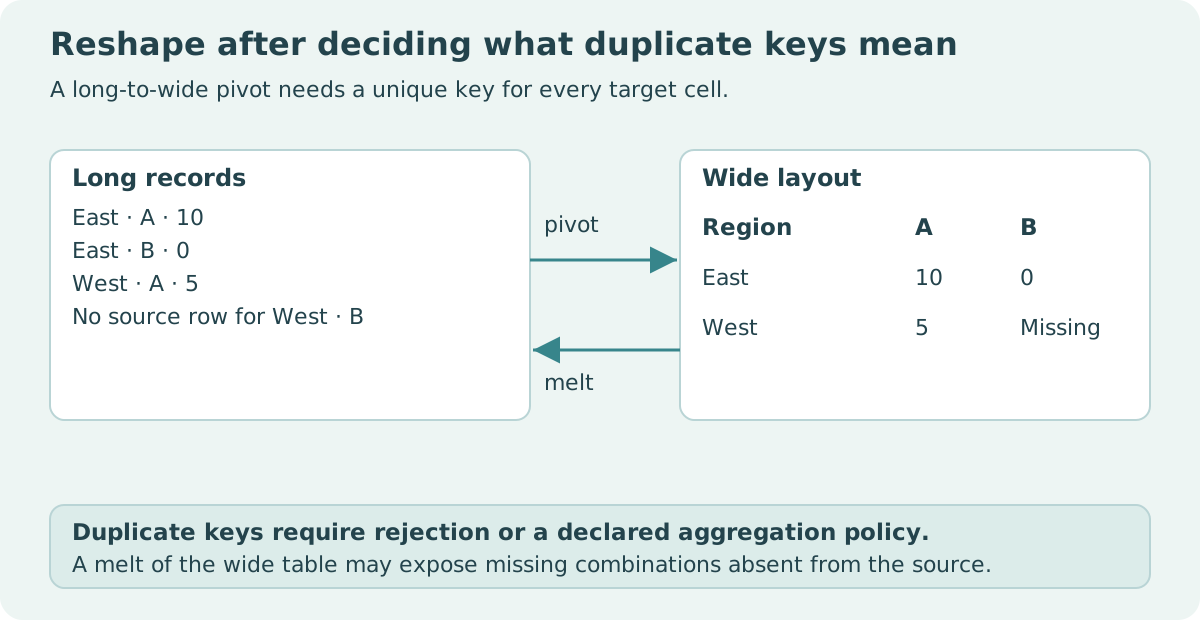
Our long table contains one recorded amount per region-product pair. East-A is ten, East-B is zero, and West-A is five. There is no source row for West-B. Under this contract, region plus product must be unique before the long table can become a wide report.
import pandas as pd

long = pd.DataFrame({
    "region": ["East", "East", "West"],
    "product": ["A", "B", "A"],
    "amount": [10, 0, 5],
})
keys = ["region", "product"]
assert not long.duplicated(keys).any()
wide = long.pivot(index="region", columns="product", values="amount")
assert wide.loc["East", "A"] == 10
assert wide.loc["East", "B"] == 0
assert pd.isna(wide.loc["West", "B"])
print(wide)
| Region | Product A | Product B |
|---|---|---|
| East | 10 | 0 |
| West | 5 | Missing source combination |
The missing wide cell is not evidence that West recorded zero for B. It is a consequence of arranging observed keys into a rectangular layout. Filling that cell with zero would assert a value that the source did not contain.
Melt changes layout and may expand combinations
The melt reference distinguishes identifier columns from measured columns. Specify id_vars and value_vars so readers can see which information stays attached to each measurement.
When our wide table is melted, its two region rows and two product columns produce four long rows. The fourth is West-B with a missing amount. The original had only three rows. A simple shape equality assertion would therefore fail even though the values represented in the wide table are behaving as expected.
import pandas as pd

original = pd.DataFrame({"region": ["East", "East", "West"],
                         "product": ["A", "B", "A"], "amount": [10, 0, 5]})
wide = original.pivot(index="region", columns="product", values="amount")
melted = wide.reset_index().melt(id_vars="region", value_vars=["A", "B"],
                                  var_name="product", value_name="amount")
assert len(melted) == 4
presence = original[["region", "product"]].assign(was_present=True)
restored = melted.merge(presence, on=["region", "product"], how="left", validate="1:1")
restored = restored[restored["was_present"].eq(True)].drop(columns="was_present")
expected = original.sort_values(["region", "product"]).reset_index(drop=True)
actual = restored.sort_values(["region", "product"]).reset_index(drop=True)
pd.testing.assert_frame_equal(actual, expected, check_dtype=False)
print("Presence-aware round trip preserves three original records")
The presence map retains identity independently of the measured value. Simply dropping every missing amount would be incorrect if the source had an explicit West-B row whose amount was unknown. Presence and observation are separate dimensions.
The test ignores dtype differences because pivoting a rectangular numeric table with missing cells can change representation. That is an explicit choice for this value-and-key round trip, not a general recommendation to disable dtype checks. If dtype is part of your supported interface, restore and assert it deliberately.
Duplicate keys are a diagnostic signal
The pivot reference requires unique target pairs. A failure tells you that the assumed grain is not true for the supplied data. Inspect all records sharing the duplicate pair rather than arbitrarily keeping the first.
import pandas as pd

frame = pd.DataFrame({"region": ["East", "East", "East"],
                      "product": ["A", "A", "B"], "amount": [10, 14, 0]})
conflicts = frame[frame.duplicated(["region", "product"], keep=False)]
assert conflicts["amount"].tolist() == [10, 14]
try:
    frame.pivot(index="region", columns="product", values="amount")
except ValueError:
    pass
else:
    raise AssertionError("Duplicate target cells should fail")
mean_report = frame.pivot_table(index="region", columns="product", values="amount",
                                aggfunc="mean", observed=True)
sum_report = frame.pivot_table(index="region", columns="product", values="amount",
                               aggfunc="sum", observed=True)
assert mean_report.loc["East", "A"] == 12
assert sum_report.loc["East", "A"] == 24
print("The same two records yield mean 12 or sum 24 under different contracts")
| Explanation for duplicate pair | Appropriate next question | Possible resolution |
|---|---|---|
| Accidental duplicate ingestion | Are these the same source event? | Deduplicate using a justified identity rule |
| Two legitimate transactions | Should the report total transactions? | Aggregate with an explicit sum |
| Different months omitted from key | Is month part of the grain? | Include month in the index or grouping |
| Conflicting snapshots | Which snapshot is authoritative? | Apply an explicit version-selection policy |
A universal drop_duplicates call cannot answer these questions. It can remove a symptom while destroying an observation or arbitrarily selecting a conflicting value. The correct resolution depends on the record's meaning.
Pivot table is aggregation, not a permissive pivot
The pivot_table reference uses mean as the default aggregation. Always write aggfunc when the reported statistic matters. A total, average, maximum, or count answers a different question and can require a different denominator.
Fill_value replaces missing output after aggregation. It does not prove a source combination was observed or that unknown values should contribute zero. If you need a fully populated presentation grid, join or reindex onto a declared category inventory and carry presence or observation counts separately.
For categorical data, set observed explicitly when your report depends on unused categories; defaults can change across pandas versions. For multi-level keys or several value columns, expect a MultiIndex layout and choose how to label or flatten it without collapsing distinct dimensions into ambiguous text.
Column order and index preservation are contracts too
Melt's default ignores the original index. Keeping it can preserve labels, but repeated index labels do not become a unique business key. Add a stable source ID when you need to trace every measured value back to a particular original record.
Explicitly order measured columns for a reproducible output. Alphabetical ordering may not match month sequence, business priority, or a categorical order. Similarly, a pivot's column-axis name is metadata that can matter to a strict round-trip comparison even when the displayed numbers match.
Do not infer a semantic change solely from an altered dtype or index label, but do not ignore those differences automatically either. State which dimensions your transformation promises to preserve: keys, values, types, order, presence, and metadata.
Several value columns need several missingness checks
If the same region-product pair carries amount and units, those columns can have different observation counts. A record might contain known units and an unknown amount. Reshaping both into a multi-level wide report should preserve that distinction rather than treating one nonmissing field as evidence that the entire record is complete.
Keep an explicit inventory of measured variables and their units. A melted table whose variable column contains both amount and units needs the unit metadata to interpret its value column. Summing that combined column would mix unlike quantities even if pandas allows the numeric operation.
For an aggregate report, calculate observation counts separately for each measure and state whether completeness is required. For a pure layout transformation, compare each measure's original key-value pairs and source presence independently. This prevents an apparently successful global round trip from hiding a loss in one measurement column.
A verification plan before exporting
Test unique cells, a real zero, an absent combination, an explicitly present row with a missing amount, and at least two conflicting records. For a round trip, compare under the exact preservation policy and inspect newly exposed combinations. Reconcile source rows before and after any deliberate aggregation.
For a report that intentionally sums transactions, test the expected total independently and publish its grain: “one row per region-product total across the selected transactions.” That statement makes the loss of individual transaction detail explicit instead of hiding it behind a rectangular table.
Sources and reproducibility
Primary references: pandas melt, pivot, and pivot_table. All three examples run independently. The figures, values, mean of twelve, and sum of twenty-four are synthetic demonstrations, not performance or market data.