Pandas 3.0 Copy-on-Write: Make Every Data Update Name Its Target
Migrate pandas pipelines to Copy-on-Write with explicit assignment targets, reproducible examples, NumPy boundaries, and output-based checks.
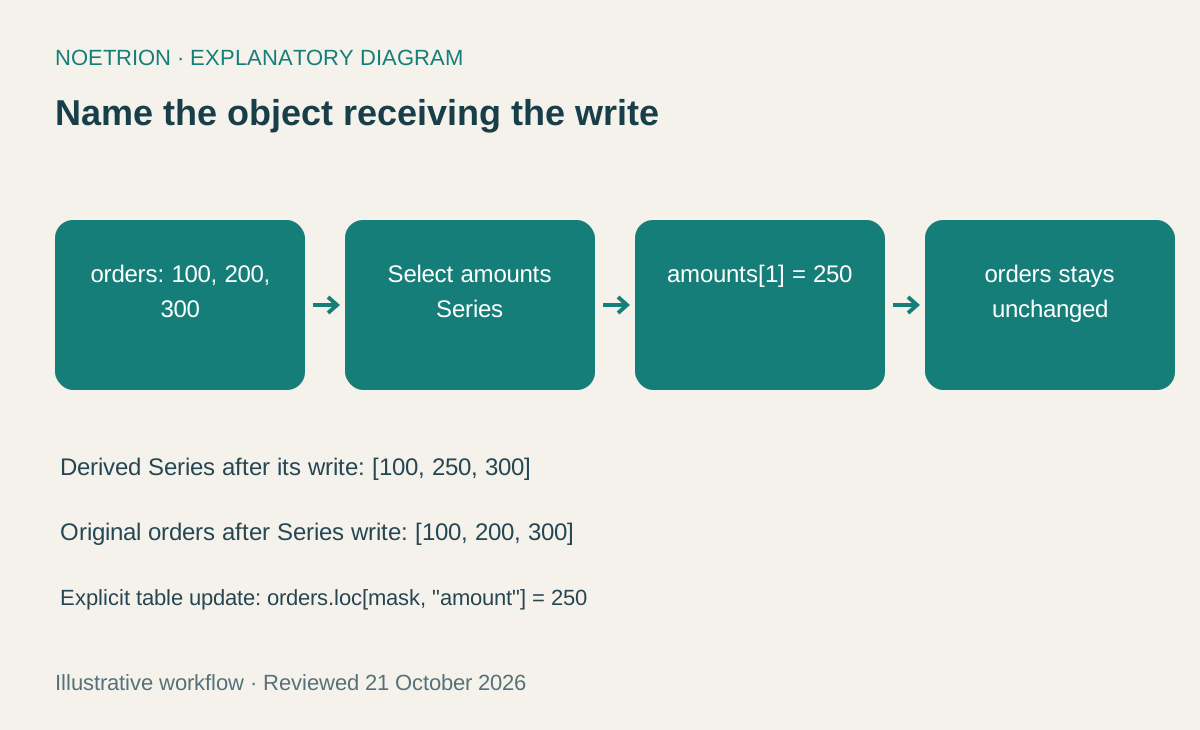
A notebook finishes without an exception. The analyst inspects a temporary column, sees the corrected value, and exports the original table. The exported file still contains the old amount. This is the kind of mistake that makes a data migration dangerous: the code looks reasonable, and the output is plausible enough to escape casual inspection.
Pandas 3.0, released January 21, 2026, made Copy-on-Write the default. The release notes also describe other changes, including the default string type, but those are separate migration tasks. This guide isolates update ownership: when a statement changes a value, which object should receive that change?
Start with object identity, not memory folklore
The Copy-on-Write guide describes a consistent rule: updating a derived pandas object does not implicitly update another pandas object from which it was obtained. Internal storage may be shared until necessary, but application logic should not depend on that storage arrangement.
There is still an important difference between creating another reference and obtaining another pandas object. In alias = orders, both names refer to the same DataFrame. Copy-on-Write does not turn an ordinary Python alias into an independent record of the past. If your workflow needs a separate object, make that intention explicit.
The practical rule for code review is simple: every write should make its intended destination obvious. “Change the order table” and “change an analysis Series” are different operations, even if they began with the same values.
Follow one correction through a small table
Suppose an example order table contains amounts of 100, 200, and 300. The second order was entered incorrectly and should be 250. This is synthetic data, chosen so the expected result is easy to inspect.
import pandas as pd

orders = pd.DataFrame({
    "order_id": ["A", "B", "C"],
    "amount": [100, 200, 300],
})
amounts = orders["amount"]
amounts.iloc[1] = 250

assert amounts.tolist() == [100, 250, 300]
assert orders["amount"].tolist() == [100, 200, 300]
These are two objects with two intended outcomes. If the business instruction was to correct the order table, the assignment above targets the wrong object. A more direct expression uses the table itself:
orders.loc[orders["order_id"].eq("B"), "amount"] = 250
assert orders["amount"].tolist() == [100, 250, 300]
The DataFrame.loc reference documents label-based selection and assignment, including Boolean selection. Here the row condition expresses business identity, and the column label expresses the field to update. The code does not rely on order B remaining at position one after future sorting.
| Statement | Intended target | Review question |
|---|---|---|
alias = orders |
Same DataFrame, another name | Is shared identity deliberate? |
amounts = orders["amount"] |
A derived Series | Will later writes target this Series or the table? |
orders.loc[mask, "amount"] = 250 |
The order table | Does the mask identify the intended records? |
draft = orders.copy() |
Another DataFrame | Does the workflow need a separate editable draft? |
Replace ambiguous chains with one update
A familiar anti-pattern is selecting a column and then assigning through a second index operation. Another is calling an inplace method on a selected Series while expecting the parent DataFrame to change. Under the documented Copy-on-Write behavior, those approaches do not perform the intended parent update.
During migration, search for writes involving a selection followed by another selection, and for column-level calls using inplace=True. A text search produces candidates, not proof of a bug. Read the surrounding intent before changing code.
For example, a correction table may map a placeholder status to a valid value. Prefer assigning the transformed Series back to its destination:
orders["status"] = pd.Series(["new", "pending", "new"])
orders["status"] = orders["status"].replace({"pending": "review"})
assert orders["status"].tolist() == ["new", "review", "new"]
This pattern exposes the write in ordinary assignment. It also creates a clear place to validate the resulting vocabulary. Fixing assignment ownership does not prove that review is an allowed business status; that requires a separate domain check.
Understand what a copy does and does not promise
The DataFrame.copy documentation distinguishes deep and shallow copying and explains the pandas 3.0 behavior of shallow copies. It also includes a crucial caveat: a deep DataFrame copy does not recursively copy arbitrary Python objects stored inside object-dtype cells.
That matters when a table contains lists or dictionaries. A team might create a “backup” DataFrame and later mutate a list in one cell, assuming the nested contents are independent. Copy-on-Write is not a general recursive object-isolation mechanism.
An editorial recommendation is to keep analytic columns scalar whenever the data model permits it. If nested objects are necessary, document ownership at the boundary and test the actual mutation path. Do not scatter expensive deep-copy operations through a pipeline merely to make uncertainty disappear. First identify what state must be independent and why.
Treat NumPy conversion as an interface contract
The to_numpy reference explains that conversion can involve a common dtype, coercion, or copying. copy=False does not guarantee a no-copy result. Under Copy-on-Write, an array sharing pandas storage may be read-only.
If a downstream numerical routine is expected to mutate its input, request its own array deliberately:
features = orders[["amount"]].to_numpy(copy=True)
features[0, 0] = -1
assert orders.loc[0, "amount"] == 100
The example defines a boundary: the external algorithm can edit features, while the table remains the source record. Before adopting it for a large dataset, measure the memory cost. A deliberate copy is a correctness decision with a resource consequence, not a free safety switch.
Avoid making an array writable simply to silence an error unless the ownership consequences are understood. A failure that reveals an unclear boundary is more informative than an apparently successful mutation that changes data elsewhere.
Audit results with invariants
A strong migration check compares what the pipeline means, not only whether it runs. For an order correction, assert the number of matching records, the corrected values, and an appropriate aggregate. In this example, changing 200 to 250 should increase the total from 600 to 650. Those numbers are an arithmetic fixture, not a claim about business data.
For a production pipeline, define invariants before upgrading: unique order identifiers, a fixed record count when no filtering is intended, nonnegative amounts where required, and reconciled totals. Run the same input through the old and proposed environments. Investigate differences individually instead of accepting a smaller warning count as proof of success.
The indexing guide is useful when a migration exposes a second issue such as label alignment. A correctly targeted assignment can still write unexpected values if an assigned Series is aligned against different labels. Add a deliberately reordered fixture so that tests cannot pass only because both objects happen to share the same row order.
Frequently asked questions
Does Copy-on-Write mean every operation copies all data immediately? No. Logical independence and physical storage allocation are different concerns. Avoid predicting memory use from the feature name alone.
Should every selection end with .copy()? No. Identify the target and the boundary first. Unnecessary copies can increase resource use without improving the business contract.
What is the most useful first migration check? Find one pipeline that updates a selected column, state the expected exported values, and test those values under the target pandas version.
Sources and review scope
Examples were executed with pandas 2.2.3 and Copy-on-Write enabled as a compatibility check. A pandas 3.0 interpreter was not available in this review; 3.0 behavior was checked against the official documentation.
Primary documentation checked October 21, 2026: pandas 3.0 release notes, Copy-on-Write guide, loc, copy, to_numpy, and indexing. Examples and audit recommendations are original educational fixtures, not benchmark results.