Python 3.15: Feature Map and a Tested UTF-8 Upgrade Plan
Plan a Python 3.15 upgrade around explicit file encodings, fresh environments, dependency compatibility, realistic fixtures, and a reversible rollout.
Reviewed October 12, 2026. Python 3.15 release facts were checked against official documentation. The two portable examples were executed with Python 3.12.14; they are not a claim that an application or dependency stack was tested on 3.15.
An accounting export arrives every Monday. For months, a small Python script has read it, cleaned the customer names, and produced a report. Then an interpreter upgrade makes the script fail on a name containing an accented character. The business process has not changed. An assumption about how bytes become text has.
That is a useful way to approach a new Python release: start with the boundaries your program depends on. Python 3.15.0 became a stable release on October 9, 2026, according to the official release page. Its new features deserve attention, but adopting a release and adopting every new feature are separate decisions. A reliable upgrade can leave the application's behavior familiar while making its environment and assumptions easier to explain.
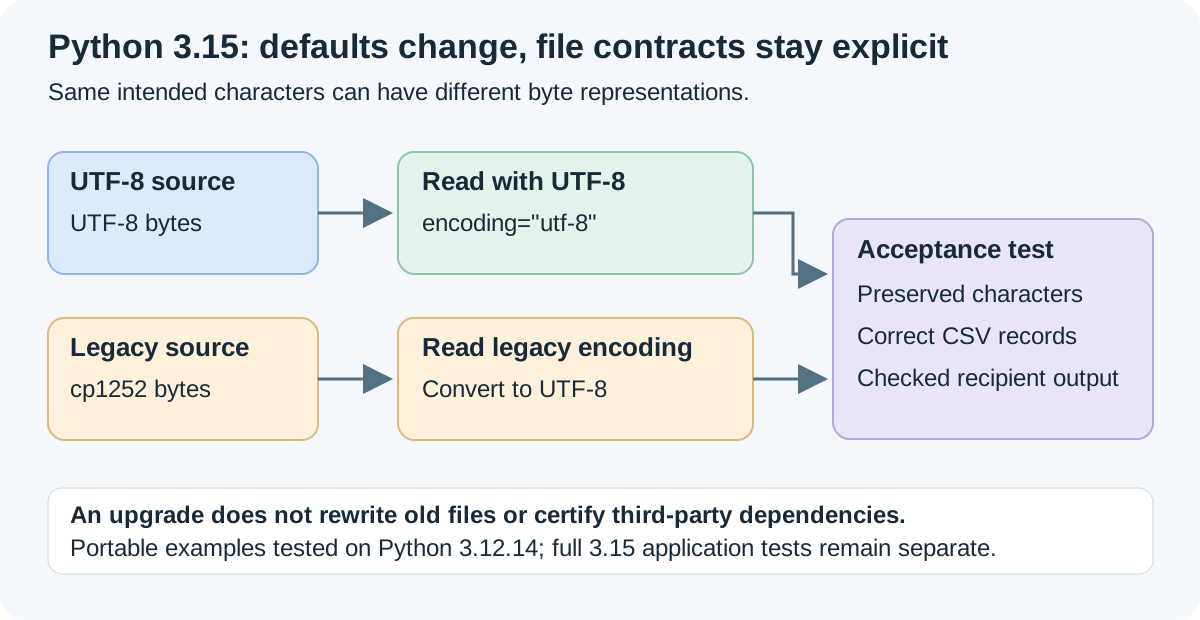
What the UTF-8 change actually means
Python 3.15 enables UTF-8 mode by default. When a text operation omits an explicit encoding, UTF-8 becomes the normal interpretation rather than an assumption inherited from the machine's locale. The Python 3.15 change notes describe the change, the compatibility options, and the continuing role of an explicit encoding argument.
The interpreter does not convert existing files on disk. A file containing Windows-1252 bytes remains such a file until something deliberately decodes and re-encodes it. The effect appears at the moment a program reads or writes text using a default. A script already specifying encoding="utf-8" has made a different promise from a script relying on whatever open() chooses.
This matters even if all your current files contain ordinary English letters. The bytes for those letters happen to be compatible with several encodings, so a limited test can conceal the assumption. Names, currencies, quotation marks, and international addresses often expose it later. A good fixture includes those characters because they represent the data boundary, rather than because a new release needs an exotic test.
| Boundary | Question to answer before upgrading | Useful evidence |
|---|---|---|
| Imported text | Which encoding does the producer promise? | Export specification and representative bytes |
| Generated text | What does the receiving system expect? | Round-trip test and consumer check |
| Child-process output | What encoding does that program emit? | Documented subprocess encoding |
| Python environment | Which interpreter and packages run the job? | Recreated environment and recorded versions |
| Release decision | What behavior must stay acceptable? | Acceptance fixtures and a rollback route |
Declare the file contract before changing the runtime
Start with the files that cross an organizational boundary: supplier exports, uploaded documents, scheduled reports, and text consumed by another service. Ask the producer for its encoding policy. If the answer is unavailable, preserve the original bytes and investigate a sample. A file extension is not an encoding declaration, and a successful decode under one encoding does not prove that its characters are correct.
The following complete program creates a small synthetic legacy export. It deliberately fails when decoded as UTF-8, then reads it correctly under its declared Windows-1252 contract and converts it to UTF-8. It does not use guessing or discard problematic characters.
from pathlib import Path
from tempfile import TemporaryDirectory

expected = "name,amount\nAndré,€25\n"

with TemporaryDirectory() as directory:
    root = Path(directory)
    legacy = root / "supplier.csv"
    legacy.write_bytes(expected.encode("cp1252"))

    try:
        legacy.read_text(encoding="utf-8")
    except UnicodeDecodeError:
        print("UTF-8 does not match the declared legacy bytes")
    else:
        raise AssertionError("The fixture should reject UTF-8")

    decoded = legacy.read_text(encoding="cp1252")
    assert decoded == expected
    converted = root / "normalized.csv"
    converted.write_text(decoded, encoding="utf-8")
    assert converted.read_text(encoding="utf-8") == expected
    assert converted.read_bytes() != legacy.read_bytes()
    print("Explicit conversion preserves the intended text")
The distinction between preserving text and preserving bytes is important. The converted file contains the same intended characters, but its byte representation differs. If a workflow checks signatures, archives original evidence, or compares byte-level hashes, keep the source file alongside the converted derivative. Record the conversion rather than pretending the derivative is the original.
Avoid using errors="ignore" as a migration shortcut. In this example, losing one byte could change a customer's name or remove the currency marker while leaving a report that still looks plausible. A deliberate failure is easier to investigate than silent deletion. Replacement characters can be useful in a diagnostic view, but should not quietly become accepted business data.
Find implicit assumptions in the code you actually run
The I/O documentation explains the optional EncodingWarning. Run representative application tasks with -X warn_default_encoding to identify places where the default is used. For example, python -X warn_default_encoding your_job.py inspects the execution path taken by that job. It is not a complete scan of every possible branch.
A warning is a prompt for a decision. Some files should be UTF-8. Others intentionally follow a local tool's encoding. A legacy integration may need encoding="locale", or preferably a specific producer-declared encoding when that is stable. The PEP 686 migration discussion distinguishes these choices and describes testing with UTF-8 mode enabled and disabled.
Search your own source for text-reading and writing operations as well as wrappers around them. A utility named load_report() can conceal an implicit open(). Check subprocess communication separately: the program at the other end may have its own conventions. Review captured logs, generated attachments, and error paths; these often receive less testing than the main dataset.
Treat warnings from dependencies as evidence to investigate rather than immediately editing installed package files. Reproducing the issue with a small fixture gives the package maintainer a clearer report and lets your team decide whether an update or a documented workaround is appropriate. The goal is an understood boundary, not merely an empty warning log.
Turn representative text into an acceptance test
A migration test should check what another person or system will receive. The next standalone program writes synthetic customer records, then checks that a CSV round trip preserves both values and characters. It covers embedded commas, a quotation mark, and non-ASCII text without depending on the operating system's default encoding.
import csv
from pathlib import Path
from tempfile import TemporaryDirectory

rows = [
    {"name": "André", "note": "Paid €25"},
    {"name": "Sari", "note": 'Requested "priority", then confirmed'},
    {"name": "山田", "note": "Follow up tomorrow"},
]

with TemporaryDirectory() as directory:
    path = Path(directory) / "customers.csv"
    with path.open("w", encoding="utf-8", newline="") as stream:
        writer = csv.DictWriter(stream, fieldnames=["name", "note"])
        writer.writeheader()
        writer.writerows(rows)

    with path.open("r", encoding="utf-8", newline="") as stream:
        actual = list(csv.DictReader(stream))

    assert actual == rows
    assert "山田".encode("utf-8") in path.read_bytes()
    print("Three records survived the explicit UTF-8 CSV contract")
The standard-library CSV documentation describes DictReader, DictWriter, and opening file objects with newline="". Those choices keep record parsing separate from the explicit encoding contract. This is a narrow test, and that is useful. If it fails, the boundary under inspection is clear. It does not prove the full reporting application is correct, validate the meaning of the notes, or check a recipient's spreadsheet settings. Add a consumer-side test for those requirements. Keep expected values independently reviewable rather than deriving them from the same code that produces the output.
For a real job, use a sanitized fixture with the same kinds of fields and missing values as production. Include a deliberately invalid file so the failure behavior is tested too. A migration that preserves successful output but turns a rejected input into an accepted one may have changed the workflow in a consequential way.
Recreate dependencies instead of carrying an old environment forward
Python itself is only part of an application's runtime. The virtual-environment documentation describes environments as isolated and disposable, with recreation preferred over moving or copying them. For an upgrade trial, create a fresh environment using the target interpreter and install the project's declared dependencies there.
Before scheduling the switch, inspect whether your required packages support the target Python version and platform. A pure-Python package and a package containing compiled extensions have different installation constraints. Successful installation is useful evidence, but it is not a substitute for executing the code paths your project uses. Conversely, one missing binary distribution does not show that Python itself is broken; it identifies a dependency readiness problem to resolve.
Keep a short compatibility record: interpreter version, operating system, package versions, installation result, import result, and application test result. For a notebook workflow, verify the selected kernel separately from the terminal interpreter. It is easy to believe a notebook has been migrated while it continues to execute in an older environment.
Change one major dimension at a time when you can. Upgrading the interpreter, replacing your dataframe library, and refactoring the data model in the same trial makes a failure harder to attribute. An interpreter-only comparison gives you a cleaner starting point; package changes can then be evaluated deliberately.
Decide what would justify the switch
Define the release criteria before testing. A daily data pipeline might require exact record counts, preserved identifiers, expected totals, readable logs, acceptable completion time, and clear failures for malformed inputs. An interactive tool may need startup, import, file-dialog, and export checks. Those are different products, so they should not share a vague rule such as “all scripts seem fine.”
If performance is a reason for upgrading, measure your own workload under comparable conditions. An official interpreter benchmark is not a forecast for your application. File access, network latency, database operations, and third-party libraries may dominate the work. Record the input, machine, build configuration, warm-up behavior, and repeated measurements before assigning a benefit to the new runtime.
A reversible rollout retains the previous deployment configuration and its dependency definitions. Run the same acceptance fixtures in both environments, resolve meaningful differences, and switch a limited workload first where your deployment system permits it. Decide who watches the first real run and what conditions trigger a return to the previous version. Rollback should be a prepared operational step, not a hurried search for yesterday's environment.
Do I need to upgrade immediately because 3.15 is stable?
No single release date determines every project's readiness. Use the official release and support information, your dependency requirements, and your operational test results to schedule the change. A stable interpreter release is evidence about Python's release status; it is not certification of your particular application stack.
Should every text operation now use UTF-8 explicitly?
Use the encoding the data contract requires. UTF-8 is a sensible explicit choice for new UTF-8 files, and it keeps behavior clear across supported interpreter versions. A known legacy file still needs its legacy encoding until it is deliberately converted. Consistency means documenting those choices rather than assigning one encoding to unrelated inputs.
A feature map before you choose an upgrade test
The Python 3.15 release documentation covers more than encoding. Match each relevant change to a test in your own application; the presence of a feature does not establish a speed improvement or dependency compatibility.
| Change | Useful next check |
|---|---|
| UTF-8 defaults | Keep legacy-encoding fixtures; use the migration exercise below |
| Explicit lazy imports | Test first-use failures and import-time side effects; see the failure-boundary guide |
| frozendict | Check shallow immutability and API expectations in the mapping guide |
| sentinel and comprehension unpacking | Check supported interpreters and readability before adopting syntax |
| Profiling and runtime changes | Measure a representative workload before making a performance claim |
This overview retains the release guide's navigation while the worked encoding fixtures below provide the migration task. The portable examples' tested interpreter remains documented; adding this map does not claim a Python 3.15 production rollout.
Primary sources and verification scope
The release date and default-encoding behavior were verified on October 12, 2026. The examples use only portable standard-library features and were run on Python 3.12.14. No Python 3.15 dependency installation, production rollout, or speed comparison is claimed here.
- Python 3.15.0 release page: stable-release date and release overview.
- What's new in Python 3.15: implemented changes and porting guidance.
- PEP 686: Make UTF-8 mode default: design rationale and compatibility choices.
- Python I/O documentation: text encoding and optional warnings.
- Python virtual-environment documentation: interpreter-specific, disposable environments.
- Python CSV documentation: dictionary records and CSV file handling.