SQLite Indexes and Query Plans: Verify the Strategy Before Claiming a Speedup
Read SQLite scan and search plans, choose a composite index for a concrete query, preserve result correctness, and separate plan evidence from timing evidence.
Reviewed October 6, 2026. Examples use Python 3.12.14 and SQLite 3.53.1. The dataset contains 100 synthetic events. No elapsed-time or storage benchmark is claimed.
A query is slow, so a developer adds an index to every column in its WHERE clause. The query remains slow, writes become more expensive, and the team points to the existence of indexes as proof that the database has been optimized. That evidence is incomplete: the relevant question is how a specific query accesses a specific population.
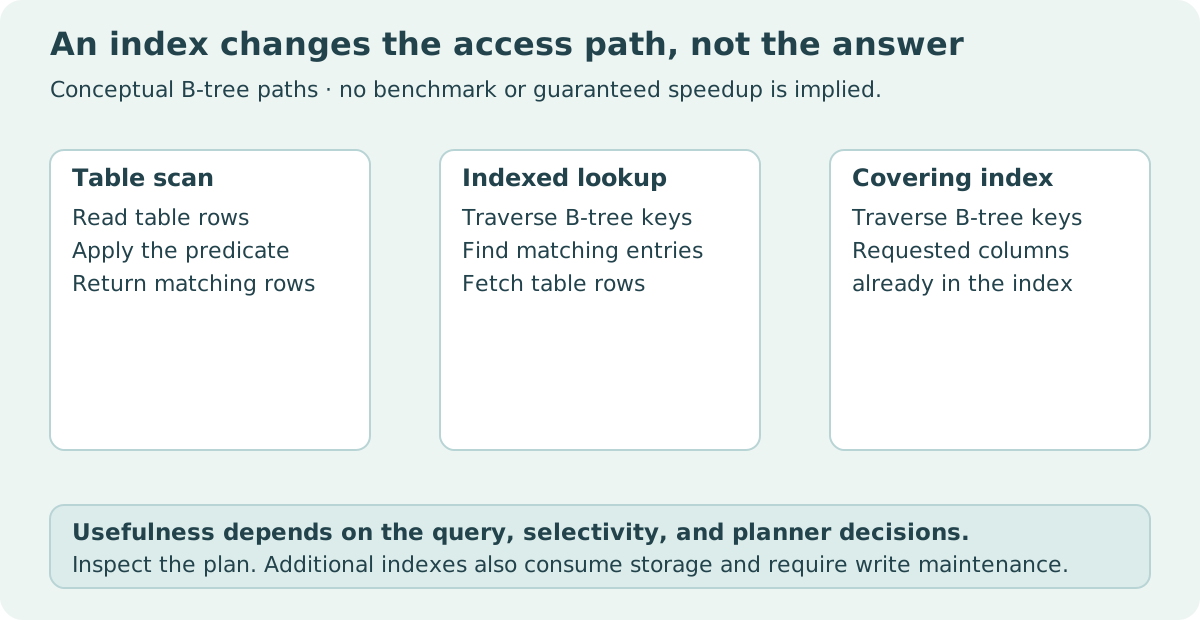
An index is an additional data structure maintained by the database. It can help locate a subset of rows, satisfy an ordering, or cover the values a query needs. Whether those capabilities help the workload depends on column order, selectivity, table size, statistics, and the actual query shape.
Practical rule: begin with one important query, inspect its plan, choose a justified index, verify unchanged results, and measure the intended workload separately. A changed plan is evidence of a changed strategy, not automatically evidence of a particular speedup.
SCAN and SEARCH are descriptions, not grades
The SQLite EXPLAIN QUERY PLAN documentation explains plan entries for scans, searches, covering indexes, and temporary B-trees. SEARCH means the engine visits a subset through its access strategy. SCAN can include an index-ordered scan, so it does not simply mean “all indexes were ignored.”
A scan can be reasonable when most rows are needed or the table is small. An index lookup can still involve many rows and additional table accesses. Read the complete plan and query rather than treating a single keyword as an optimization score.
Plan output is intended for interactive diagnosis and can change between SQLite versions. Do not build a durable production parser depending on an exact human-readable phrase. The runnable example displays observed plans and verifies returned values; it does not assert a particular plan string as a universal contract.
| Plan observation | Useful interpretation | Unsupported conclusion |
|---|---|---|
| Table scan | Rows are traversed under that access path | The query is necessarily badly designed |
| Search using an index | A subset can be located through the index | The fastest possible strategy has been proven |
| Covering index | Required query values are available in the index | Every other query is also covered |
| Temporary B-tree for ordering | A separate sorting structure is used | A specific elapsed-time penalty was measured |
Match a composite index to a query
Our query selects a category and orders its events by occurred_at. It returns occurred_at and amount. An index beginning with category and then occurred_at can support that equality filter and order relationship; adding amount can cover the selected values for this query.
import sqlite3

with sqlite3.connect(":memory:") as database:
    database.execute("""CREATE TABLE events(
        id INTEGER PRIMARY KEY, category TEXT, occurred_at INTEGER, amount INTEGER
    )""")
    database.executemany("INSERT INTO events VALUES (?, ?, ?, ?)",
        [(i, "A" if i % 10 == 0 else "B", i, i % 7) for i in range(100)])
    query = "SELECT occurred_at, amount FROM events WHERE category = ? ORDER BY occurred_at"
    before = database.execute(query, ("A",)).fetchall()
    before_plan = database.execute("EXPLAIN QUERY PLAN " + query, ("A",)).fetchall()
    database.execute("""CREATE INDEX idx_events_category_time_amount
                        ON events(category, occurred_at, amount)""")
    after = database.execute(query, ("A",)).fetchall()
    after_plan = database.execute("EXPLAIN QUERY PLAN " + query, ("A",)).fetchall()
assert before == after == [(i, i % 7) for i in range(0, 100, 10)]
print("SQLite:", sqlite3.sqlite_version)
print("Before:", before_plan)
print("After:", after_plan)
print("Result rows:", len(after))
On the checked SQLite 3.53.1 runtime, the unindexed plan used a scan and temporary ordering structure; afterward it used a search through the covering index. The exact output is an observed result of this fixture and runtime. Re-run the program to inspect your own version's plan.
The answer equality is essential. Adding an index should not intentionally change the query's selected values. If a result's order was never specified, however, a different access path can expose that missing ordering contract. Always use ORDER BY when presentation order matters.
Column order encodes a useful access relationship
A composite index is ordered lexicographically by its columns. Leading equality constraints can identify a relevant range within that structure. A later ordering column can be useful when the preceding relationship matches the query. This is more specific than “index every filter.”
The SQLite query planner guide explains multi-column and covering-index behavior. It also shows why a column sequence that helps one query may not help a different one equally. A query filtering only occurred_at has a different access requirement from our category-first query.
Do not turn a simplified leftmost-prefix explanation into a claim that the engine can never use another strategy. SQLite supports planner behavior such as skip-scan under relevant conditions. The reliable method is to inspect the actual plan for the actual query and data, then interpret it with the engine documentation.
| Workload change | Question to revisit |
|---|---|
| Filter by category, order by time | Does the category-time relationship match the plan? |
| Filter only by time | Is category still a useful leading dimension? |
| Select many more fields | Is the existing index still covering? |
| Return nearly every row | Is an index lookup better than a scan? |
| Insert or update frequently | What is the maintenance cost of extra indexes? |
A covering index duplicates some values from the table. That can reduce table fetches for a read query while increasing storage and write maintenance. The tradeoff belongs to the whole workload, not just one SELECT statement.
Parameters protect the query boundary
The example uses placeholders for category values. Do not assemble user-provided values into SQL through string interpolation. Parameter binding keeps values separate from SQL syntax and allows the same query structure to be reused with different inputs.
Parameters do not select table or column identifiers in the same way. If your application lets users choose an ordering column, select from an explicit supported identifier map instead of treating arbitrary text as safe SQL. Query structure and data values have different boundaries.
import sqlite3

with sqlite3.connect(":memory:") as database:
    database.execute("CREATE TABLE items(category TEXT, amount INTEGER)")
    database.executemany("INSERT INTO items VALUES (?, ?)", [("A", 10), ("B", 20)])
    text = "A' OR 1=1 --"
    result = database.execute("SELECT amount FROM items WHERE category = ?", (text,)).fetchall()
assert result == []
print("The supplied text is one category value, not executable SQL syntax")
This is a small boundary demonstration, not a full application security review. It establishes that this supplied value is bound as data in this query. Other query construction, permissions, and deployment choices require their own controls.
A plan does not measure elapsed time
To claim a speedup, define a benchmark population and workload. Record database version, schema, index definitions, row counts, value distribution, query parameters, and cache conditions. Compare repeated runs under a method that does not accidentally include unrelated setup in only one side.
Measure the metrics that matter: latency distribution, throughput, write cost, and storage overhead can all be relevant. A single tiny in-memory example is useful for explaining a strategy but cannot support a general performance claim for a large disk-backed production database.
Statistics and data distribution can change a planner's choice. Maintain and inspect statistics under the engine's documented recommendations, but do not assume a plan captured once remains permanently correct. The SQLite analysis guidance discusses how statistics inform planning.
A useful experiment also preserves the result fixture. Faster wrong results are not an optimization. Verify selected values and any contractual ordering before interpreting the timing comparison.
Avoid indiscriminate index accumulation
Every retained index has a purpose and a maintenance cost. Review overlap between indexes, but do not remove one solely because its columns appear in another: uniqueness, partial predicates, sort direction, expression semantics, and the actual workload can make them meaningfully different.
A unique index is also a data constraint, not merely an access optimization. Dropping it can change what invalid duplicate data the database accepts even if another read index remains. Separate correctness requirements from performance experiments.
For a small project, keep a short index note: the query it supports, the result contract, the observed plan, and any measured workload result. That documentation is more durable than a screenshot saying “SEARCH” without the query or dataset.
Sources and reproducibility
Primary references: EXPLAIN QUERY PLAN, SQLite query planning, and ANALYZE. Both examples use in-memory databases and assert known answers. The observed plan change is documented; no numerical performance gain has been tested or claimed.