Fewer Workplace Interruptions Start With Clear Response Agreements
Read Microsoft's interruption statistics carefully and design practical response agreements that protect focus while keeping urgent work and handoffs moving.
A colleague sends “quick question.” You stop an analysis, answer, reopen the file and try to remember the assumption you were checking. Another colleague sends a genuinely urgent incident through the same channel. Both messages look equally important until you inspect them.
This is partly a coordination problem. People interrupt because they do not know when they will receive an answer, which channel is monitored, or what counts as urgent. Turning off notifications without changing those expectations can simply move the uncertainty to someone else.
Microsoft's Breaking down the infinite workday, published June 17, 2025, offers a useful prompt to examine digital workload. Its methodology also shows why popular interruption headlines need careful reading. The response agreement below is an original team experiment, not a Microsoft-tested intervention.
Read the interruption statistic correctly
Microsoft's methodology states that the familiar two-minute figure concerns the top 20% of users by incoming ping volume. Its 275-per-day count uses a 24-hour day; the two-minute interval relates to core work hours. The telemetry excludes education and EU tenants and ends February 15, 2025.
Those details matter. The headline is not a stopwatch study showing that every worker loses concentration every two minutes. A ping is also not proof that the person stopped working to read it. The report is evidence of communication intensity within a defined platform population, not a universal estimate of cognitive recovery time.
That narrower reading still leaves a practical question: which incoming requests actually change your team's work, and which can wait for a predictable response window?
Map requests before changing notifications
For one week, record a small sample of requests using topic, urgency, channel, required decision and resolution time. Avoid collecting private message contents unnecessarily. The purpose is to identify work patterns, not rank colleagues by how often they contact others.
Distinguish emergencies, same-day dependencies and ordinary information requests. A customer-facing support role may require continuous coverage. A research or engineering task may benefit from longer uninterrupted blocks. The right arrangement depends on the service the team owes others.
| Request type | Example | Useful routing rule |
|---|---|---|
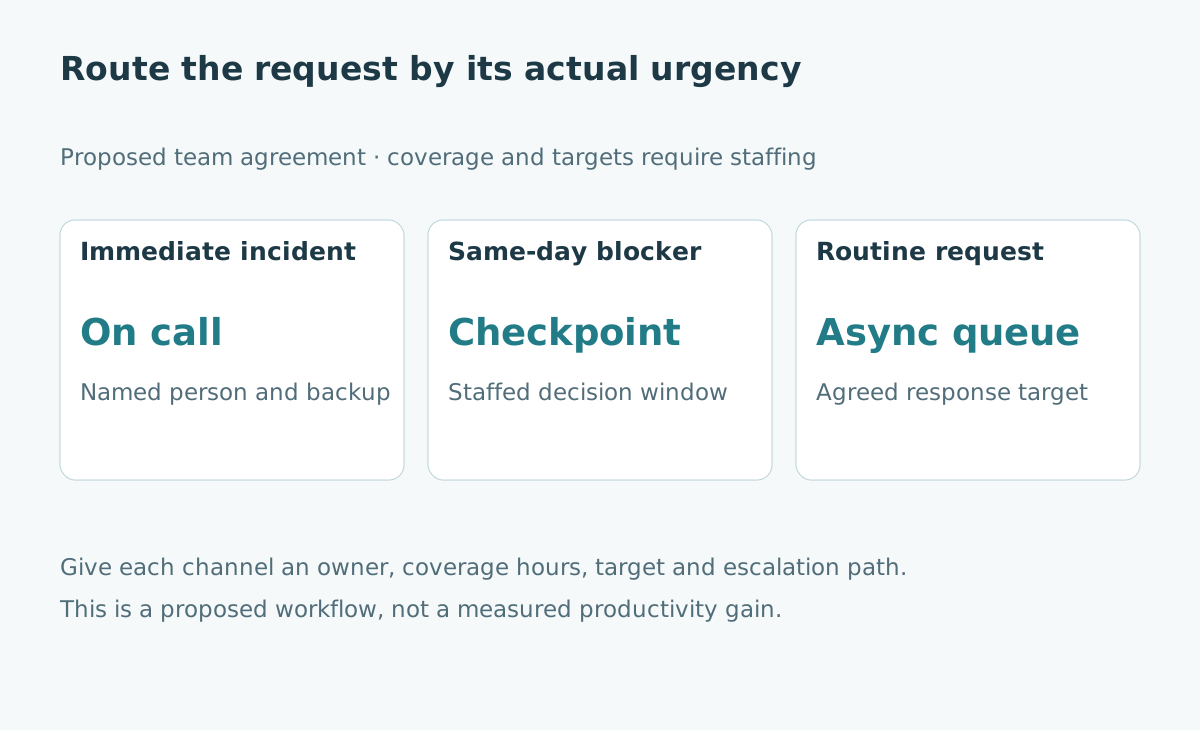
| Immediate incident | A live service is failing | Named on-call route with backup |
| Work blocked today | Approval needed before today's release | Staffed decision window and escalation |
| Routine question | Clarify next month's report format | Asynchronous queue with an agreed target |
| Information only | Status update with no action needed | Digest or documented project record |
An urgency tag only helps if people share a definition. “Important to me” and “requires interruption now” are not identical. Give an example of each category and review misrouted requests without punishing reasonable uncertainty.
Write a response agreement with four fields
Every channel needs an owner, a monitoring schedule, a target response time and an escalation path. A target is a commitment the team intends to meet under stated conditions; it should not imply a guaranteed resolution time for every problem.
For example, a routine queue might be reviewed at 11:00 and 16:00 on working days. The person submitting a request knows when to expect acknowledgement. A release blocker can go to a staffed checkpoint. A production incident reaches the on-call person immediately.
State the timezone and what happens outside coverage hours. A message sent at 17:59 should not accidentally create an all-night obligation because “within two hours” lacked a working-hours definition.
Show why batching changes the experience
Consider an invented day with twelve routine requests. If each request causes an immediate switch, the worker changes context twelve times. If the same requests are handled in three windows, there are three planned request-processing sessions.
This example does not prove a fixed number of minutes saved. The actual cost depends on task complexity, request clustering and the worker's control over timing. It illustrates a structural reduction in unplanned transitions, which must be balanced against the time requesters wait.
| Synthetic arrangement | Routine requests | Planned response sessions | Main tradeoff |
|---|---|---|---|
| Immediate response | 12 | Not scheduled | Short waits, fragmented primary work |
| Three staffed windows | 12 | 3 | More predictable focus, longer request waits |
| No stated coverage | 12 | Unknown | Uncertainty and repeated follow-ups |
A team cannot declare three windows and leave them unstaffed. The agreement needs enough capacity to process the queue, and an alternative for a request that would otherwise stop essential work.
Improve the handoff, not just the channel
A useful request states the decision needed, context, deadline and relevant artifact. “Can you check this?” makes the receiver reconstruct all four. “Please confirm whether these totals use net or gross revenue before 15:00; the two definitions are compared in this table” is easier to handle asynchronously.
For unfinished work, leave a short resumption note: current state, next action, open question and location of evidence. This can help after an unavoidable interruption and supports a colleague taking over. Keep it short enough to maintain during real work.
AI can draft a summary, but the accountable person should verify what was decided and what remains unresolved. An elegant summary that invents agreement creates a new coordination problem.
Test the agreement for two weeks
Choose one team and a limited request category. Record turnaround time, missed urgent cases, reopened requests and completion of primary work. Ask requesters whether the agreement made access clearer, not merely whether the team received fewer messages.
Do not use message count alone as the success measure. A reduction may reflect better documentation, but it could also mean colleagues stopped asking necessary questions. Check whether rework, delays or safety problems increased.
Make the agreement easy to revise. If a daily dependency consistently misses a checkpoint, change the checkpoint or its staffing. If everything is labeled urgent, examine incentives and unclear ownership before blaming individual behavior.
Protect accessibility and role differences
The W3C explanation of interruption control highlights that interrupting updates can disrupt users, including people using assistive technologies. It is web accessibility guidance, not a workplace productivity trial, but it reinforces the value of giving people appropriate control over nonemergency interruptions.
Different people may need different communication formats. Keep urgent routes accessible and provide written records for decisions made verbally. The agreement should reduce ambiguity without requiring everyone to work in precisely the same way.
For a related organizational discussion, see workplace AI and job design. A useful coordination change can often begin before buying another productivity tool.
Sources and scope
- Microsoft WorkLab: Breaking down the infinite workday, including methodology.
- W3C: Understanding interruptions, accessibility context.
Checked October 22, 2026. The request categories, sample day and experiment are original proposals. No percentage productivity improvement is asserted.