How to Store API Keys Safely in an AI Web Application
Learn where to store AI API keys, why frontend code and localStorage are not secret stores, and how backend controls and key rotation reduce exposure.
Checked on October 2, 2026. This guide covers application architecture, not a security audit of a particular site. Scenarios are teaching examples. Check service capabilities again when implementing them.
An AI chat website can run with HTML and JavaScript. However, placing a developer's API key in JavaScript delivered to visitors also delivers the key to their devices. Hiding it from the interface or renaming its variable does not make it secret.
Short answer: keep the developer's API key in a backend or secret manager, and let the frontend call an application endpoint. The backend identifies users, limits usage, and forwards approved requests to the AI provider. For official browser-specific mechanisms, follow their documented limits rather than treating every key and token as interchangeable.
Separate credentials, sessions, and conversation history
A provider API key authorizes requests with particular permissions and quota. A user session identifies who is using your application. Chat history stores conversation content. These have different purposes, lifetimes, and risks.
Deleting a session does not necessarily revoke an API key. Clearing chat history does not necessarily remove credentials. Keeping a key longer can reduce repeated entry while also extending its presence on a device. Decide each policy separately.
| Data | Owner or purpose | Storage to consider |
|---|---|---|
| Developer API key | Application service access and quota | Backend secret |
| User session | Application user identity | An appropriately designed session mechanism |
| Chat history | Conversation content | Storage aligned with consent and need |
| User-supplied key | The user's credential | Explicit policy and a deletion option |
These are not universal storage decisions. A private application using its owner's key differs from a public service paying for every visitor. Establish who owns the credential and who pays for requests before designing persistence.
Why can visitors read a frontend key?
Browsers must receive the code they execute. Users can inspect JavaScript files and Network activity. Obfuscation changes the code's form. When a credential is used directly by the browser, that device ultimately possesses enough information to send it.
The Gemini API key documentation explicitly advises against exposing production keys on the client and recommends backend calls. The official Google JavaScript SDK repository also distinguishes browser SDK support from safe production key handling.
A working SDK example demonstrates connectivity and request construction, not that its key placement is appropriate for a public website. Production architecture needs access boundaries, cost controls, and a way to revoke credentials.
A .env file does not guarantee server-only storage
An .env file supplies configuration. Its security depends on the code and build process reading it. If a build embeds a value into a frontend bundle, that value becomes a public asset. The original filename does not change its final location.
Test the build with a synthetic credential marker that is easy to recognize. Search the public assets for it. If it appears, that configuration is not keeping the value server-side. There is no need to use a real key for a leakage experiment that a fake marker can demonstrate.
For Cloudflare Workers, the secrets documentation describes bindings available to Worker code. The principle is to read env.AI_API_KEY in a server handler without returning it to the browser. Other frameworks and providers have different mechanisms; follow their documentation.
A basic architecture for a public application
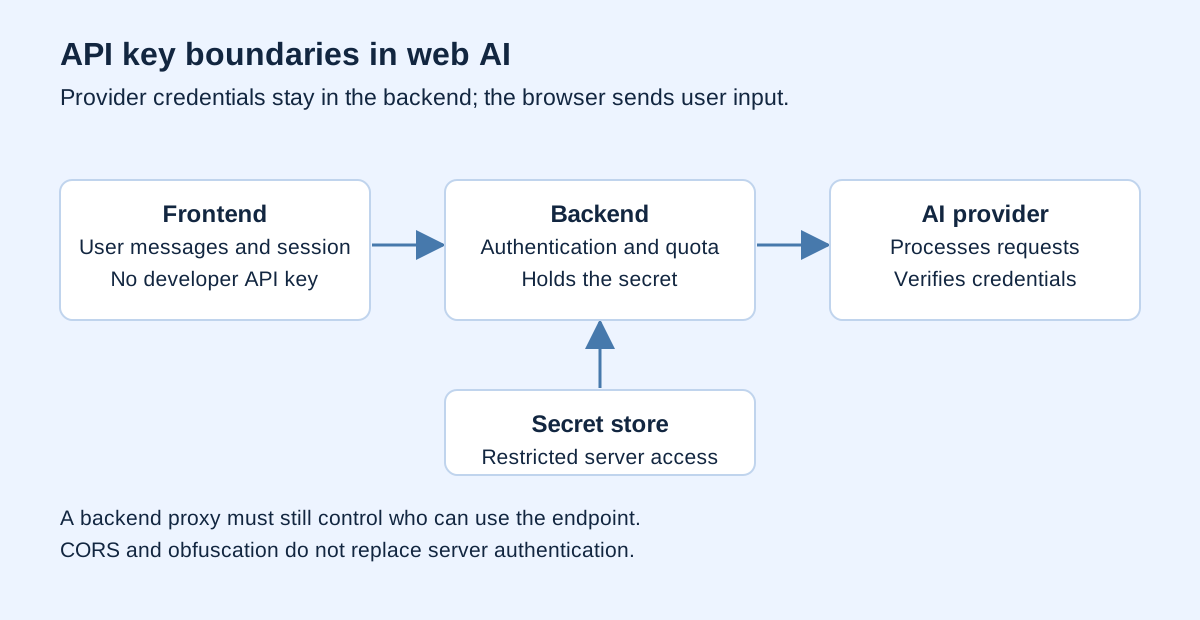
The user sends a message to your endpoint. The backend checks the session and usage limits, calls the AI service with its server key, and returns the necessary result. Never include the key in response metadata or debugging output.
Keep the backend input contract narrow. A chat endpoint might accept bounded text and use a server-selected model. It generally does not need client-controlled provider URLs, authentication headers, or unrestricted configuration. Every additional controllable parameter expands what the backend must validate.
This is pseudocode, not a production implementation:
handleChat(request, secrets):
  session = authenticate(request)
  input = validateChatInput(request)
  enforceUserQuota(session.userId)
  enforceApplicationBudget()
  result = callApprovedModel(
    key=secrets.AI_API_KEY,
    input=input
  )
  return sanitizedChatResponse(result)
Each function names a control that must actually exist. Merely naming enforceUserQuota does not implement a counter. With multiple backend instances, decide how usage state is shared so a limit does not apply only within one process.
A backend proxy still needs access controls
Moving the key to a server prevents exposure in the frontend bundle, but others may still invoke a public endpoint. Unlimited anonymous access can exhaust your application's quota without revealing its key. Identity checks and usage controls solve a different problem from secret storage.
Set relevant limits on requests per user, input length, upload size, duration, and model selection. A small demo has different needs from a commercial service. Begin with explainable limits and observe legitimate usage failures before relaxing them.
Consider retries as well. Repeating a quota-rejected request indefinitely usually does not solve the problem. If a connection fails after the provider processes a request, retrying may create additional usage. Define when retries are permitted and what users should be told.
Why CORS is not a login mechanism
The MDN CORS guide describes cross-origin controls enforced by browsers. Allowing only your site's origin helps govern browser interactions, but it does not authenticate all possible clients to your endpoint.
Requests can originate from programs outside the browser. Do not treat an origin header as the sole proof that a caller may consume your quota. Verify the appropriate session or application credentials in the backend, then add limits and monitoring.
CORS helps a browser decide whether a page can read a cross-origin response. Authentication helps a server identify the requester. These decisions interact but have different purposes. Confusing them can leave an endpoint apparently protected while its usage remains unrestricted.
Memory, sessionStorage, and localStorage
The OWASP HTML5 Security Cheat Sheet warns that JavaScript can access local storage and that XSS can retrieve or modify its contents. localStorage is not a server secret store.
| Option | Convenience | Limit to understand |
|---|---|---|
| Page memory | Does not persist after reload | Scripts in the same execution context remain a risk |
| sessionStorage | Can persist within the tab session | Still accessible to JavaScript |
| localStorage | Convenient across visits | Persists until deletion and remains script-accessible |
| Backend secret | Not delivered as a frontend asset | Backend access, administration, and logs still need protection |
For a private application where users bring their own keys, explicitly offer remember this key on this device and a delete button. Do not silently enable permanent storage. Explain the purpose of network requests, who receives the key, and whether a backend is involved.
Encrypting a key with a decryption key embedded in the same JavaScript does not establish a strong secrecy boundary. If the application decrypts automatically, code controlling that execution context can try to access the decrypted result. Evaluate convenience against the threat model, not just an algorithm's name.
When can an official browser mechanism be used?
Not every client integration uses an ordinary server API key. Firebase AI Logic supplies a proxy gateway with App Check integration. That is a specific service architecture, not general permission to embed provider secrets in arbitrary frontends.
For the Gemini Live API, a backend can issue short-lived, constrained ephemeral tokens for client connections. The documentation checked for this guide identifies Live API compatibility. Do not assume those tokens replace a key for every text-generation endpoint.
Choose mechanisms for the service you actually use. Record preview status where applicable, token issuance, expiry, constraints, and authentication of the issuing backend. Short-lived tokens reduce the misuse window but do not eliminate the need to control who requests new tokens.
What to do after a key is exposed
OWASP Secrets Management covers credential lifecycles, including rotation and revocation. Removing a string from the newest page does not invalidate copies already collected. Treat that credential as exposed.
- Revoke or disable the exposed key through the provider.
- Review available usage, error, and cost records.
- Create a replacement with the permissions actually needed.
- Update the server configuration using it.
- Remove the exposure from source, public assets, logs, and the build process.
- Test that the old credential is rejected and the new application path works.
Operational order may depend on service continuity, but the outcome must include revocation of the old key. Cleaning repository history does not replace rotation. Once a secret was public, you cannot establish that every copy disappeared.
A practical audit exercise
Build with a fake key marker and search public assets for it. Inspect browser requests for provider keys in headers or parameters. Check structured errors for leaked configuration. Use synthetic credentials throughout.
Next, test the application endpoint without a session, with oversized input, and after a user's quota is exhausted. Define expected outcomes before testing. Record helpful status and messages without exposing internal configuration. This aligns with AI system evaluation and input trust boundaries. If the client cannot read the result, continue with JSON response diagnosis while keeping credentials redacted.
Frequently asked questions
Is every API key a secret?
No. Public configuration identifiers and secret credentials both exist. Follow the provider's classification for that particular key rather than transferring assumptions between products.
Does HTTPS hide a frontend key?
HTTPS protects transmission. The receiving device still obtains data intentionally delivered to it, including credentials used by its client code.
Does a budget alert stop charges?
Do not assume a notification is a hard spending limit. Check actual provider quota and spending controls, then implement application usage controls.
Should a user's key always be stored?
No. Choose persistence according to need, consent, and risk. Re-entry can be an acceptable trade-off for short sessions. Public applications generally benefit from a backend holding the developer's key.
Verification and sources
Start with credential ownership and trust boundaries. Keep developer keys in the backend, identify users separately, and control usage independently. Respect product-specific limits for special browser mechanisms. Convenient key entry is useful only when storage, exposure, and revocation are understood.
Google AI, the official Google SDK, Firebase, Cloudflare, MDN, and OWASP are linked beside relevant explanations; accessed October 2, 2026. The pseudocode was not tested against paid services and is not a production endpoint. Following the diagram alone does not establish that a project is secure.