Fixing Invalid JSON and Unexpected Token Errors
Diagnose invalid JSON and Unexpected token errors through syntax, HTTP responses, encoding, and JSON Schema, with examples and practical checks.
Checked on October 2, 2026. Examples use standard JSON and JavaScript. All sample data is synthetic; do not paste credentials or personal information into an untrusted validator.
An Unexpected token error does not always mean a misplaced comma. Your application may be reading HTML as JSON, receiving an empty response, or processing truncated text. Changing characters without checking the data's origin can hide an endpoint problem while only removing its immediate symptom.
Short answer: inspect the original input, HTTP status, and content type when data comes from an API, then validate JSON syntax. Once parsing succeeds, check the schema and application rules. Successful JSON.parse() does not establish that the data is correct for your business task.
Three checks that are often confused
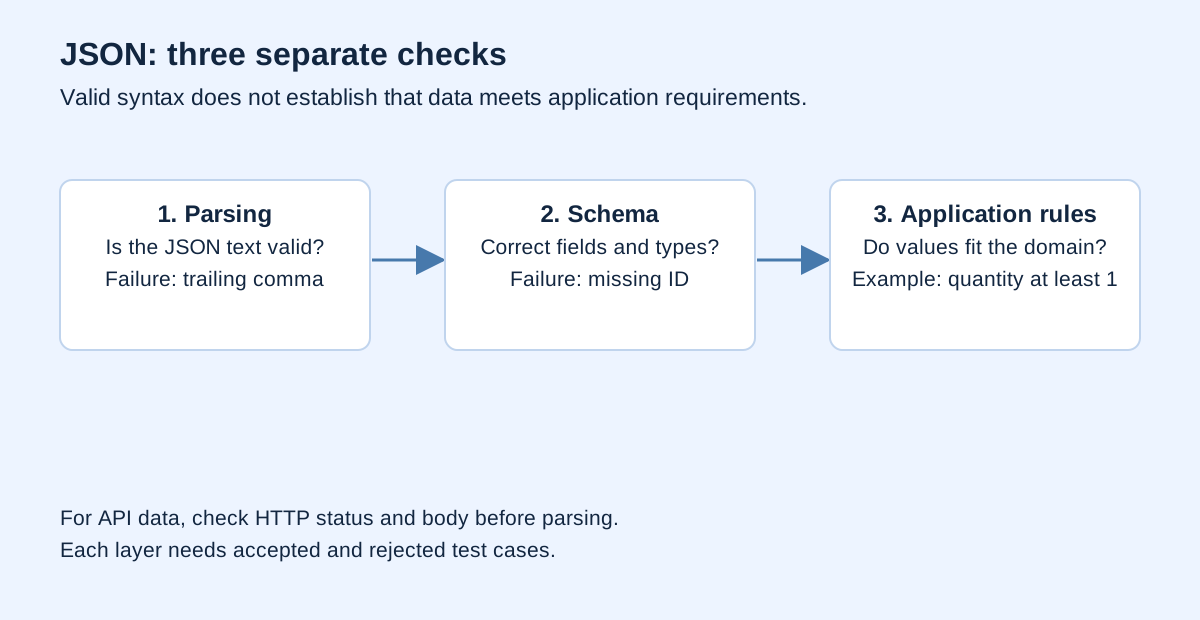
Receiving JSON involves three different questions. Does the text follow JSON grammar? Does the parsed value contain the expected fields and types? Do its values make sense for the intended operation? One check does not replace the others.
| Layer | Example problem | Appropriate check |
|---|---|---|
| Syntax | Trailing comma or single quotes | JSON parser |
| Structure | Text in an age field that requires a number |
JSON Schema or type validation |
| Application rules | Negative order quantity | Explicit domain rules |
For example, {"quantity": -3} is valid JSON. A schema requiring only an integer quantity can also accept it. If an order must contain at least one item, add that bound and explain the reason. Separating these layers produces clearer error messages.
Recognize the basic syntax rules
RFC 8259 defines JSON as a data-interchange format. Object property names are double-quoted strings. Values can be objects, arrays, strings, numbers, true, false, or null. JSON is data, not JavaScript code to execute.
This example is deliberately invalid:
{
  'name': 'Nia',
  'active': True,
}
It contains three separate problems: single quotes, an uppercase boolean, and a comma after the last property. The valid version is:
{
  "name": "Nia",
  "active": true
}
Do not replace every quotation mark globally. Names, sentences, and escapes inside strings can legitimately contain special characters. Correct the structure through a parser or serializer rather than context-blind text substitutions.
Treat parser messages as location clues
The MDN JSON parsing error reference describes several parsing failures. Message wording differs between runtimes. A reported position often marks where the parser can no longer continue; the original mistake may occur earlier.
| Symptom | Initial explanation to test | Useful next step |
|---|---|---|
< near the beginning |
HTML was received as JSON | Inspect response body and status |
| Unexpected end | Empty or truncated text | Check body length and origin |
| Unquoted property | JavaScript object literal used as JSON | Serialize the object correctly |
Error near } or ] |
Trailing comma or mismatched delimiters | Inspect preceding characters |
True, None, or undefined |
Another language's representation | Use that language's JSON serializer |
These are hypotheses, not conclusions. < can appear at different positions, and a valid JSON string may contain it. Inspect the actual response rather than diagnosing from a single word in the error.
Diagnose API data before parsing it
The MDN Fetch guide explains that HTTP errors such as 404 do not automatically reject the fetch() promise. Check response.ok or the status before treating the body as a successful result.
async function getJson(url) {
  const response = await fetch(url);
  const contentType = response.headers.get("content-type") ?? "";
  const raw = await response.text();

  if (!response.ok) {
    throw new Error(`HTTP ${response.status}`);
  }
  if (!/\bapplication\/(?:[\w.-]+\+)?json\b/i.test(contentType)) {
    throw new Error("Response does not declare a JSON content type");
  }
  if (raw.trim() === "") {
    throw new Error("Empty body; check the endpoint contract");
  }
  return JSON.parse(raw);
}
This is a diagnostic example, not a universal API client. Some endpoints legitimately return no body after an operation. Their application contract should distinguish an empty result from a JSON result. Do not force all responses into the same shape.
The function reads the body once as text, then parses that text. Do not call response.json() followed by response.text() on the same body without an appropriate cloning strategy. For diagnostics, retain only necessary information such as status, content type, and structured errors. Avoid printing complete bodies containing user data.
Why did the API return HTML?
Investigate an incorrect URL, a login page, a frontend route replacing a backend endpoint, or an intermediary's error page. The browser Network panel can reveal the final URL, status, headers, and body. Confirm the request reached the intended endpoint before concluding that the JSON server is broken.
In a teaching scenario, code requests /api/items, but a static application has no such route and returns its HTML page. The parser then fails at the markup. Removing < from the response does not repair the route; it destroys evidence useful for diagnosing it.
For domain resolution, connection, or cache problems, see DNS, HTTPS, and CDNs. JSON concerns the representation received, while delivery layers may explain why that representation differs from what you expected.
Serialize objects rather than assembling strings
In JavaScript, create an object and call JSON.stringify(). Avoid building JSON through interpolation of arbitrary user input. Quotes and newlines can break hand-built text without proper escaping.
const record = {
  name: 'Nia "A"',
  note: "first line\nsecond line"
};
const text = JSON.stringify(record, null, 2);
const restored = JSON.parse(text);
console.log(restored.name === record.name); // true
This round trip checks whether serialized data can be read back. It does not establish that every JavaScript type retains its full meaning. Dates and values outside ordinary JSON types require a deliberately designed serialization contract.
For Python data, use its JSON serializer rather than str(dictionary). The Python json documentation provides dumps() and loads(). A human-readable dictionary representation is not a JSON interchange contract.
Valid JSON still needs a numeric and identifier policy
JSON has a number type, but JavaScript's Number representation has integer precision limits. The JSON.parse() documentation notes that numeric precision may already be lost before a conventional reviver handles the result.
Use strings for identity numbers, transaction codes, and postal codes when they are not mathematical quantities. "00123" preserves leading zeros. Writing 00123 as a number also violates standard JSON syntax, while writing 123 changes the identifier representation.
This does not mean every number should become a string. Ages, counts, and measurements may need numeric types. Establish each field's contract consistently from sender to receiver. For financial data, define units and arithmetic rather than leaving decimal interpretation implicit.
Validate structure with JSON Schema
The JSON Schema object reference distinguishes properties, required, and additional-property handling. Listing a property in properties does not automatically make it mandatory.
{
  "$schema": "https://json-schema.org/draft/2020-12/schema",
  "type": "object",
  "properties": {
    "id": {"type": "string"},
    "quantity": {"type": "integer", "minimum": 1}
  },
  "required": ["id", "quantity"],
  "additionalProperties": false
}
This schema accepts {"id":"00123","quantity":2}. It rejects a missing ID, a quantity below the bound, or additional properties. Rejecting additional fields is a contract choice, not universally the best policy. An evolving API may need another approach to avoid breaking old clients on compatible additions.
Check which schema draft your validator supports. Do not assume every validator implements every keyword from every draft. When using the Noetrion JSON Formatter, follow its stated capabilities. Production validation needs a pinned validator version tested against the API contract.
Build a small, checkable fixture
Try these four inputs: {"id":"00123","quantity":2}, {"id":"00123","quantity":2,}, {"quantity":2}, and {"id":"00123","quantity":0}. The second fails parsing. The third and fourth can parse but fail the example schema. The first satisfies this example's rules.
Record why each input should be accepted or rejected. This creates a useful fixture of inputs and expected outcomes rather than just a collection of valid JSON. When the schema changes, inspect whether each changed outcome is intentional.
For tabular data, the CSV–JSON Converter helps explore local conversion. Recheck column names and types afterward: switching formats does not enforce the application contract. For AI web responses, also read protecting API keys so diagnostic logs do not expose credentials.
Frequently asked questions
Does a formatter automatically repair JSON?
A formatter generally needs parseable input. Heuristic repair tools may guess the intended structure; compare their output with the original source before using it.
Can JSON contain comments?
Standard JSON has no comments. Some configuration formats use extensions such as JSONC. Confirm the application supports that format before adding comments.
Can an array or a single value be JSON?
Yes. JSON is not limited to objects. Your endpoint contract may nevertheless require a particular top-level object or array.
Why does the application fail after parsing succeeds?
Parsing only turns valid text into a value. Missing fields, incompatible types, and violated application rules require additional checks.
Verification and sources
Inspect the data actually received, then its syntax, structure, and meaning. Add HTTP and body-contract checks for API responses. Use serializers when creating JSON and fixtures when testing it. This produces explainable repairs without silently discarding information.
RFC 8259, MDN, Python, and JSON Schema are linked beside the claims they support; accessed October 2, 2026. Code and fixtures are original Noetrion demonstrations. A schema does not replace authentication or application security checks.